# Welcome

Cryptopay offers the easiest and cheapest way to accept payments in bitcoin and other cryptocurrencies in Europe. We help innovative businesses around the world to incorporate cryptocurrency into their payment flows. We offer developer tools to accept cryptocurrency payments with an option of exchange rate hedging so that our customers are never exposed to cryptocurrency price volatility. &#x20;


# Introduction

Cryptopay is a payment gateway and business wallet that allows merchants to automate the processes of accepting cryptocurrency payments and payouts from their customers, as well as making currency exchange transactions and receiving data on the transaction history and account balance statuses for reporting.


# Environments

In addition to the Production environment, Cryptopay also provides developers with a test environment - Sandbox, which mirrors the production environment and works with test networks (testnets) of all the cryptocurrencies that Cryptopay supports. Thus, developers can use the Sandbox environment to develop and test integration via [Cryptopay API.](https://reference.cryptopay.me/)

| Environment | Base URL                                                                   |
| ----------- | -------------------------------------------------------------------------- |
| Sandbox     | <https://business-sandbox.cryptopay.me>                                    |
| Production  | [https://business.cryptopay.me](<&#xA;https://business.cryptopay.me&#xA;>) |

The Sandbox environment and the Production environment are independent and not connected to each other in any way.&#x20;

Here are the other base URLs utilized by Cryptopay, depending on the environment:

<table><thead><tr><th width="209.2578125">Utilized for</th><th width="260.27734375">Production</th><th>Sandbox</th></tr></thead><tbody><tr><td>Hosted page (for <a href="/pages/-Lk4LpuyIOEyGGF_UJp6">invoices</a> and <a href="/pages/-Lk8twPZubp5Y-Xg-E80">channels</a>)</td><td><a href="https://business-hosted.cryptopay.me/">https://business-hosted.cryptopay.me/</a></td><td><a href="https://hosted-business-sandbox.cryptopay.me/">https://hosted-business-sandbox.cryptopay.me/</a></td></tr><tr><td>Widget (<a href="/pages/-LdIdhMAAWnI7h2GCQxV">online checkout</a>)</td><td><a href="https://business-widget.cryptopay.me/widget.js">https://business-widget.cryptopay.me/widget.js</a></td><td><a href="https://widget-business-sandbox.cryptopay.me/widget.js">https://widget-business-sandbox.cryptopay.me/widget.js</a></td></tr><tr><td><a href="/pages/VLg57hSAS2G9C9u4oLoY">Payment links</a></td><td><a href="https://business-pay.cryptopay.me/">https://business-pay.cryptopay.me/</a></td><td><a href="https://pay-business-sandbox.cryptopay.me/">https://pay-business-sandbox.cryptopay.me/</a></td></tr><tr><td>Hosted Item</td><td><a href="https://business-catalog.cryptopay.me/">https://business-catalog.cryptopay.me/</a></td><td><a href="https://catalog-business-sandbox.cryptopay.me/">https://catalog-business-sandbox.cryptopay.me/</a></td></tr><tr><td>Web checkout (Legacy)</td><td><a href="https://business-checkout.cryptopay.me/">https://business-checkout.cryptopay.me/</a></td><td><a href="https://checkout-business-sandbox.cryptopay.me/">https://checkout-business-sandbox.cryptopay.me/</a></td></tr><tr><td>Website / merchant account</td><td><a href="https://cryptopay.me/business/">https://cryptopay.me/business/</a></td><td><a href="https://business-sandbox.cryptopay.me/business/">https://business-sandbox.cryptopay.me/business/</a></td></tr></tbody></table>


# Creating a Test Account

Before proceeding with API integration, the developer will need to register and set up a test account. In order to do that, the following actions are required:

* Register a test account by following this link: <https://business-sandbox.cryptopay.me/auth/signup>
* You will receive an "Email address confirmation" letter asking you to confirm your email address – click on the blue "Confirm your email" button, and you will be redirected to the account password creation page. Create a password and log in to your account
* Enable Two-factor authentication (2FA). This is a mandatory action. Once 2FA is enabled, you can use the security code 000000 to log in.
* Contact your Integration or Account Manager at Cryptopay to activate your test account. You can also ask them to top up your test balances to be able to make test payments<br>


# API Credentials

Once your Cryptopay account is activated, you can generate the API Key and API Secret that are required to authenticate the API and indicate the Callback URL.

{% hint style="info" %}
Note that only **Root** and **Admin** user roles can access the Integration > API page.

Here is [*a quick article*](https://help.cryptopay.me/en/articles/3415142-multiple-users-in-a-business-account) on how to manage users in your Cryptopay account.
{% endhint %}

<figure><img src="https://files.cryptopay.me/b2b/git_book_files/01_API_Credentials_01.webp" alt=""><figcaption></figcaption></figure>

* **Callback URL** – in this field, you can specify the URL to which Cryptopay will send callbacks&#x20;
* **Callback Secret** – in this field, you can view the secret for [validating callbacks](https://developers.cryptopay.me/introduction/callbacks#security) and generate a new secret if necessary

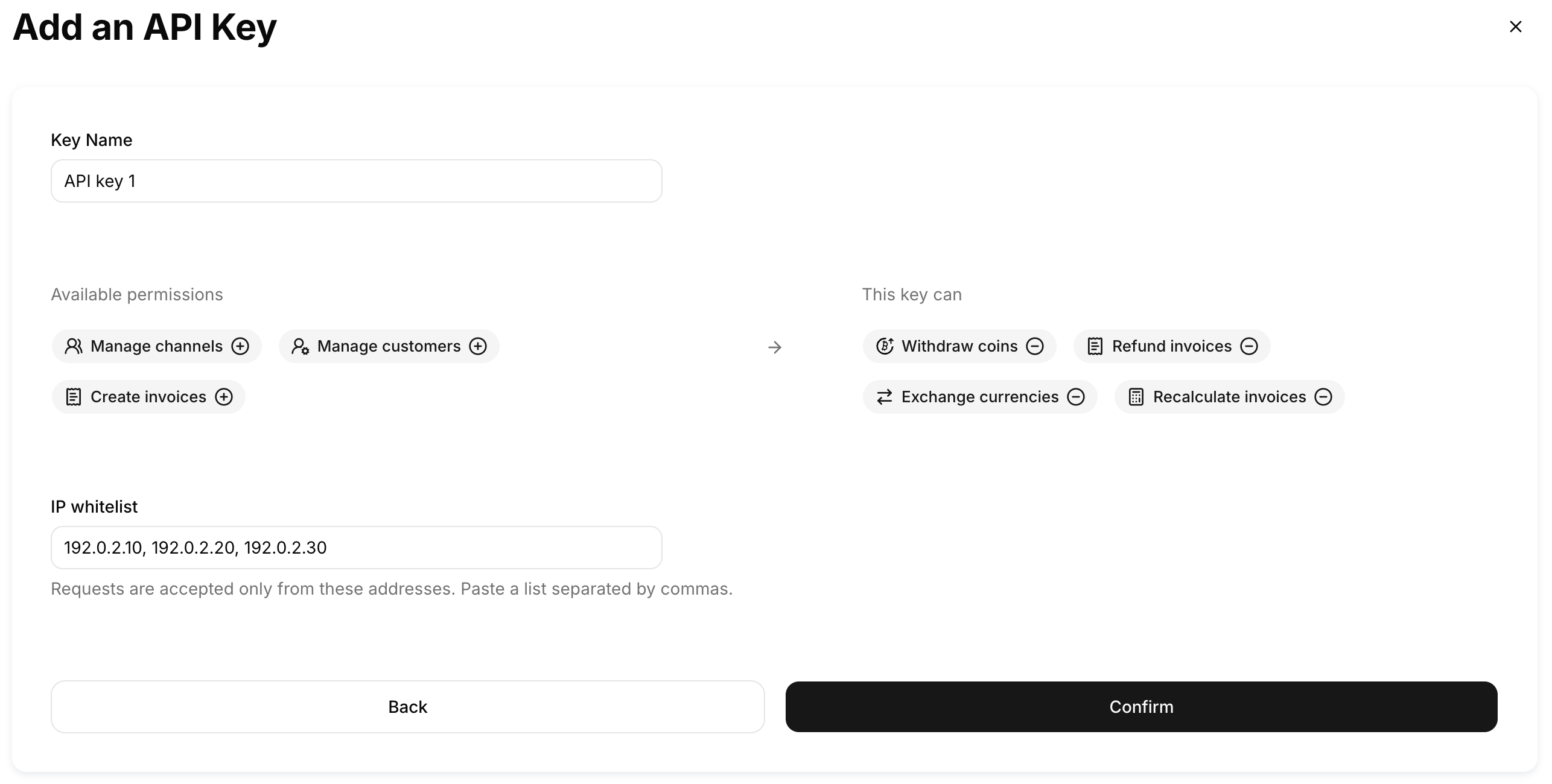
API keys - here you can generate the **API Key** and **API Secret** [to authenticate](https://developers.cryptopay.me/introduction/authentication) the Cryptopay API, specify the necessary permissions for the key to be created, and add IP addresses to the whitelist of that key.

<figure><img src="https://files.cryptopay.me/b2b/git_book_files/01_API_Credentials_02.png" alt=""><figcaption></figcaption></figure>

<figure><img src="https://files.cryptopay.me/b2b/git_book_files/01_API_Credentials_03.png" alt=""><figcaption></figcaption></figure>

The API secret should be stored on your side. Since it is only displayed once, you should write the API secret down or copy it into your application code immediately. If it is lost, you will need to delete the compromised API key and generate a new one.


# API Basics

### Our API is REST-based on HTTPS

* It works with standard HTTP verbs like `GET`, `POST` and `PATCH`
* We use standard HTTP error responses to describe errors
* All API requests MUST be made over SSL, including outgoing webhooks. Any non-secure requests return as `ssl_required`, and no redirects are performed
* POST data should be encoded as standard `application/json`
* All our responses are in JSON format


# Responses

Cryptopay API operates[ HTTP status codes](http://www.iana.org/assignments/http-status-codes/http-status-codes.xhtml) to indicate the status of user’s requests including both successful and unsuccessful responses.

Responses will also include JSON-formatted data for further details:

* 1xx (Informational): The request is received, continuing process
* 2xx (Successful): The request is successfully received, understood, and accepted
* 3xx (Redirection): Further action needs to be taken in order to complete the request
* 4xx (Client Error): The request contains bad syntax or cannot be fulfilled
* 5xx (Server Error): The server failed to fulfil an apparently valid request

| Status code                   | Meaning                                                                                                                                                                                           |
| ----------------------------- | ------------------------------------------------------------------------------------------------------------------------------------------------------------------------------------------------- |
| `200 OK`                      | Standard response for successful HTTP requests                                                                                                                                                    |
| `201 Created`                 | The request has been fulfilled, resulting in the creation of a new resource                                                                                                                       |
| `202 Accepted`                | The request has been accepted for processing, but the processing has not been completed                                                                                                           |
| `204 No Content`              | The server successfully processed the request and is not returning any content                                                                                                                    |
| `304 Not Modified`            | Indicates that the resource has not been modified since the version specified by the request headers If-Modified-Since or If-None-Match                                                           |
| `400 Bad Request`             | The server cannot or will not process the request due to an apparent client error (e.g., malformed request syntax, size too large, invalid request message framing, or deceptive request routing) |
| `401 Unauthorized`            | Most likely you weren't able to construct and sign your API request correctly using HMAC                                                                                                          |
| `403 Forbidden`               | You don't have required permissions to perform requested action on the resource. Check your API key whitelist                                                                                     |
| `404 Not Found`               | We don't have the resource you've requested                                                                                                                                                       |
| `409 Conflict`                | Most likely the `custom_id` value you are trying to use had been used before                                                                                                                      |
| `422 Unprocessable Entity`    | The request was well-formed but was unable to be followed due to semantic errors                                                                                                                  |
| `429 API rate limit exceeded` | Amount API requests for api\_key exceeded 200 requests per minute                                                                                                                                 |
| `500 Internal Server Error`   | We have a problem with our server                                                                                                                                                                 |
| `503 Service Unavailable`     | We are temporarily offline for maintenance                                                                                                                                                        |


# Date formats

All timestamps are formatted using ISO 8601 format (RFC 3339). For those API calls that require a timestamp to be specified, it is necessary to use date and time in this format.

Example:

```
1994-11-15T08:12:31+00:00
```


# Authentication

API authentication is performed using the HMAC request signature sent in the `Authorization` header.&#x20;

```
curl -X POST \
  https://business-sandbox.cryptopay.me/api/invoices \
  -H 'Authorization: HMAC DjlHuWlApznJ7vrhPBL0fA:N2eEvkJQ07EpFau90pL5xMpBO3g=' \
  -H 'Content-Type: application/json' \
  -H 'Date: Tue, 25 Sep 2018 17:41:40 GMT' \
  -d '{"price_amount":"100","price_currency":"EUR","pay_currency":"BTC"}'  
```

HMAC-SHA1 is an algorithm defined by [RFC 2104](https://www.ietf.org/rfc/rfc2104.txt) — Keyed-Hashing for Message Authentication. The algorithm takes as input two byte-strings, a key, and a message.


# How it works

The following describes steps, required to authenticate request signature using HMAC-SHA1:

1. You construct an API request (for API calls)
2. You calculate a keyed-hash message authentication code (HMAC-SHA1) signature using your API secret
3. You include both the API key and the signature in the `Authorization` header, and then call the API
4. The API uses your API key to look up your API secret
5. The API reconstructs the signature from the request data and the API secret with the same algorithm you used to calculate the signature you sent in the request
6. If the signature generated by Cryptopay matches the one you sent in the request, the request is considered authentic. If the comparison fails the request is discarded and Cryptopay returns `401` or `403` error responses:

{% tabs %}
{% tab title="401" %}

```javascript
{
  "error": {
    "code": "unauthenticated",
    "message": "unauthenticated",
    "details": []
  },
  "meta": {
    "request_id": "932e4625b1735951f471cb7e7d3dab6e"
  }
}
```

{% endtab %}

{% tab title="403" %}

```javascript
{
  "error": {
    "code": "unauthorized",
    "message": "unauthorized",
    "details": []
  },
  "meta": {
    "request_id": "932e4625b1735951f471cb7e7d3dab6e"
  }
}
```

{% endtab %}
{% endtabs %}


# Signature

The Signature is the RFC 2104 HMAC-SHA1, of selected elements from the request, and so the Signature part of the `Authorization` header will vary from request to request.

| Component                                                  | Description                                                                                                                                                                  |
| ---------------------------------------------------------- | ---------------------------------------------------------------------------------------------------------------------------------------------------------------------------- |
| HTTP method                                                | `GET`, `POST`, `PUT`, `PATCH`                                                                                                                                                |
| MD5 hash sum of the string with JSON-serialized parameters | If there are no parameters in the request body (e.g.  `GET`), you then need to place just an empty string `""` as there is nothing to hash. **Do not hash an empty string**. |
| Content-Type                                               | `application/json`                                                                                                                                                           |
| Date                                                       | [HTTP-date](https://tools.ietf.org/html/rfc7231#section-7.1.1.2) format e.g. `Tue, 15 Nov 1994 08:12:31 GMT`. The time offset is 15 minutes                                  |
| Request URI                                                | Everything that is after the base URL e.g. `/api/invoices`                                                                                                                   |

Here is a piece of pseudo-code that demonstrates the `Authorization` header construction. `\n` means the Unicode code point `U+000A`, commonly called a newline:

```
StringToSign = HTTP-Verb + “\n” +
   Content-MD5 + “\n” +
   Content-Type + “\n” +
   Date + “\n” +
   Path

Signature = Base64( HMAC-SHA1( Api.secret, UTF-8-Encoding-Of( StringToSign ) ) );

Authorization = "HMAC " + Api.key + “:” + Signature;
```

So this should look like the Authorization header below:

```
curl -X POST \
  https://business-sandbox.cryptopay.me/api/invoices \
  -H 'Authorization: HMAC DjlHuWlApznJ7vrhPBL0fA:N2eEvkJQ07EpFau90pL5xMpBO3g=' \
  -H 'Content-Type: application/json' \
  -H 'Date: Tue, 25 Sep 2018 17:41:40 GMT' \
  -d '{"price_amount":"100","price_currency":"EUR","pay_currency":"BTC"}'  
```

{% hint style="info" %}
Make sure that the date used for signature is the same you put in the Date header
{% endhint %}


# Creating a signature. Code samples

{% tabs %}
{% tab title="Java" %}

```java
import java.nio.charset.StandardCharsets;
import java.security.InvalidKeyException;
import java.security.MessageDigest;
import java.security.NoSuchAlgorithmException;
import java.util.Base64;
​
import javax.crypto.Mac;
import javax.crypto.spec.SecretKeySpec;
​
class Main {
  public static void main(String[] args) throws NoSuchAlgorithmException, InvalidKeyException {
    String secret = "Oe8TBDzg4tatdq2cL9ojeEj3U3oWSCSC5fqOHAqaKVg";
    String method = "POST";
    String body = "{\"amount\":\"100\"}";
    String date = "2019-01-09T11:24:40+00:00";
    String path = "/api/auth/test";
    String contentType = "application/json";
​
    // 5173e4d02d8a761679b0165b87d9ee5f
    String bodyMD5 = body.isEmpty() ? "" : md5hex(body);
​
    // POST\n5173e4d02d8a761679b0165b87d9ee5f\napplication/json\n2019-01-09T11:24:40+00:00\n/api/auth/test
    String stringToSign = String.join("\n", method, bodyMD5, contentType, date, path);
​
    // fVYzUdYqZO1ozBeP3KQHFp9/Kno=
    String signature = hmac(stringToSign, secret);
​
    System.out.println(signature);
  }
​
  private static String md5hex(String str) throws NoSuchAlgorithmException {
    MessageDigest md5 = MessageDigest.getInstance("MD5");
    byte[] bytes = md5.digest(str.getBytes(StandardCharsets.UTF_8));
​
    return hex(bytes);
  }
​
  private static String hmac(String str, String secret) throws InvalidKeyException, NoSuchAlgorithmException {
    SecretKeySpec secretKey = new SecretKeySpec(secret.getBytes(StandardCharsets.UTF_8), "HmacSHA1");
​
    Mac mac = Mac.getInstance("HmacSHA1");
    mac.init(secretKey);
    byte[] result = mac.doFinal(str.getBytes(StandardCharsets.UTF_8));
​
    String base64 = Base64.getEncoder().encodeToString(result);
​
    return base64;
  }
​
  private static String hex(byte[] bytes) {
    StringBuilder sb = new StringBuilder();
​
    for (byte b : bytes) {
      sb.append(String.format("%02x", b));
    }
​
    return sb.toString();
  }
}
```

{% endtab %}

{% tab title="C#" %}

```csharp
using System;
using System.Collections.Generic;
using System.IO;
using System.Net;
using System.Security.Cryptography;
using System.Text;
​
class Test {
  public static int Main() {
    Test test = new Test("https://business-sandbox.cryptopay.me", "your_API_key", "your_API_secret");
​
    Console.WriteLine(test.CreateInvoice("{\"price_amount\":\"0.5\",\"price_currency\":\"ETH\",\"pay_currency\":\"ETH\"}"));
    Console.WriteLine(test.ListInvoices());
​
    return 0;
  }
​
  private APIClient client;
​
  public Test(string baseURL, string key, string secret)
  {
    APIAuth auth = new APIAuth(key, secret);
    client = new APIClient(baseURL, auth);
  }
​
  public string CreateInvoice(string data)
  {
    return client.DoRequest("POST", DateTime.Now, "/api/invoices", data);
  }
​
  public string ListInvoices()
  {
    return client.DoRequest("GET", DateTime.Now, "/api/invoices");
  }
}
​
class APIClient {
  private string baseURL;
  private APIAuth auth;
​
  public APIClient(string url, APIAuth apiAuth)
  {
    baseURL = url;
    auth = apiAuth;
  }
​
  public string DoRequest(string verb, DateTime date, string path, string data = "", string contentType = "application/json", List<KeyValuePair<string, string>> Headers = null)
  {
    ServicePointManager.SecurityProtocol = SecurityProtocolType.Tls12;
​
    HttpWebRequest request = (HttpWebRequest)WebRequest.Create(baseURL + path);
    HttpWebResponse response;
    StreamWriter sw;
    StreamReader sr;
    string dateStr;
    string responseData;
​
    request.Method = verb;
    request.ContentType = contentType;
    request.ContentLength = data.Length;
    request.Date = date;
​
    dateStr = date.ToUniversalTime().ToString("r");
    request.Headers.Add("Authorization", auth.GenerateAuthorizationHeader(verb, data, contentType, dateStr, path));
​
    if (verb != "GET") {
      sw = new StreamWriter(request.GetRequestStream());
      sw.Write(data);
      sw.Close();
    }
​
    response = (HttpWebResponse)request.GetResponse();
    sr = new StreamReader(response.GetResponseStream());
    responseData = sr.ReadToEnd();
​
    return (responseData);
  }
}
​
class APIAuth {
  private string key;
  private string secret;
​
  public APIAuth(string apikey, string apisecret)
  {
    key = apikey;
    secret = apisecret;
  }
​
  public string GenerateAuthorizationHeader(string httpVerb, string jsonBodyStr, string httpContentType, string dateStr, string relativeUrl)
  {
    string signature = GenerateSigniture(httpVerb, jsonBodyStr, httpContentType, dateStr, relativeUrl);
​
    return $"HMAC {key}:{signature}";
  }
​
  public string GenerateSigniture(string httpVerb, string jsonBodyStr, string httpContentType, string dateStr, string relativeUrl) {
    string jsonBodyHash = String.IsNullOrEmpty(jsonBodyStr) ? "" : GetMD5Hash(jsonBodyStr);
​
    string signitureData = string.Join("\n", httpVerb, jsonBodyHash, httpContentType, dateStr, relativeUrl);
​
    byte[] apiSecretBytes = Encoding.UTF8.GetBytes(secret);
​
    byte[] signitureBytes = Encoding.UTF8.GetBytes(signitureData);
​
    var hmacsha1 = new HMACSHA1(apiSecretBytes, false);
​
    byte[] resultBytes = hmacsha1.ComputeHash(signitureBytes);
​
    return Convert.ToBase64String(resultBytes);
  }
​
  private string GetMD5Hash(string text) {
    StringBuilder returnvalue = new StringBuilder();
​
    MD5CryptoServiceProvider cryptoSP = new MD5CryptoServiceProvider();
​
    byte[] HashBytes = Encoding.UTF8.GetBytes(text);
​
    HashBytes = cryptoSP.ComputeHash(HashBytes);
​
    foreach(byte bte in HashBytes)
​
      returnvalue.Append(bte.ToString("x2").ToLower());
​
    return returnvalue.ToString();
  }
}
```

{% endtab %}

{% tab title="VB.NET" %}

```java
Imports System
Imports System.Collections.Generic
Imports System.IO
Imports System.Net
Imports System.Security.Cryptography
Imports System.Text
 
Class Test
    Public Shared Function Main() As Integer
        Dim auth As APIAuth = New APIAuth("key", "secret")
        Dim client As APIClient = New APIClient("https://business-sandbox.cryptopay.me", auth)
        Dim path As String = "/api/invoices"
        Dim data As String = "{""price_amount"":""0.5"",""price_currency"":""ETH"",""pay_currency"":""ETH""}"
        Dim response As String = client.DoRequest(DateTime.Now, path, data)
        Console.WriteLine(response)
        Return 0
    End Function
End Class
 
Class APIClient
    Private baseURL As String
    Private auth As APIAuth
 
    Public Sub New(ByVal url As String, ByVal apiAuth As APIAuth)
        baseURL = url
        auth = apiAuth
    End Sub
 
    Public Function DoRequest(ByVal date As DateTime, ByVal path As String, ByVal Optional data As String = "", ByVal Optional contentType As String = "application/json", ByVal Optional Headers As List(Of KeyValuePair(Of String, String)) = Nothing, ByVal Optional verb As String = "POST") As String
        ServicePointManager.SecurityProtocol = SecurityProtocolType.Tls12
        Dim request As HttpWebRequest = CType(WebRequest.Create(baseURL & path), HttpWebRequest)
        Dim response As HttpWebResponse
        Dim sw As StreamWriter
        Dim sr As StreamReader
        Dim dateStr As String
        Dim responseData As String
        request.Method = verb
        request.ContentType = contentType
        request.ContentLength = data.Length
        request.Date = date
        dateStr = date.ToUniversalTime().ToString("r")
        request.Headers.Add("Authorization", auth.GenerateAuthorizationHeader(verb, data, contentType, dateStr, path))
        sw = New StreamWriter(request.GetRequestStream())
        sw.Write(data)
        sw.Close()
        response = CType(request.GetResponse(), HttpWebResponse)
        sr = New StreamReader(response.GetResponseStream())
        responseData = sr.ReadToEnd()
        Return (responseData)
    End Function
End Class
 
Class APIAuth
    Private key As String
    Private secret As String
 
    Public Sub New(ByVal apikey As String, ByVal apisecret As String)
        key = apikey
        secret = apisecret
    End Sub
 
    Public Function GenerateAuthorizationHeader(ByVal httpVerb As String, ByVal jsonBodyStr As String, ByVal httpContentType As String, ByVal dateStr As String, ByVal relativeUrl As String) As String
        Dim signature As String = GenerateSigniture(httpVerb, jsonBodyStr, httpContentType, dateStr, relativeUrl)
        Return $"HMAC {key}:{signature}"
    End Function
 
    Public Function GenerateSigniture(ByVal httpVerb As String, ByVal jsonBodyStr As String, ByVal httpContentType As String, ByVal dateStr As String, ByVal relativeUrl As String) As String
        Dim jsonBodyHash As String = GetMD5Hash(jsonBodyStr)
        Dim signitureData As String = String.Join(vbLf, httpVerb, jsonBodyHash, httpContentType, dateStr, relativeUrl)
        Dim apiSecretBytes As Byte() = Encoding.UTF8.GetBytes(secret)
        Dim signitureBytes As Byte() = Encoding.UTF8.GetBytes(signitureData)
        Dim hmacsha1 = New HMACSHA1(apiSecretBytes, False)
        Dim resultBytes As Byte() = hmacsha1.ComputeHash(signitureBytes)
        Return Convert.ToBase64String(resultBytes)
    End Function
 
    Private Function GetMD5Hash(ByVal text As String) As String
        Dim returnvalue As StringBuilder = New StringBuilder()
        Dim cryptoSP As MD5CryptoServiceProvider = New MD5CryptoServiceProvider()
        Dim HashBytes As Byte() = Encoding.UTF8.GetBytes(text)
        HashBytes = cryptoSP.ComputeHash(HashBytes)
 
        For Each bte As Byte In HashBytes
            returnvalue.Append(bte.ToString("x2").ToLower())
        Next
 
        Return returnvalue.ToString()
    End Function
End Class
```

{% endtab %}

{% tab title="PHP" %}

```php
<?php

namespace Cryptopay;

class Authentication
{
  private $apiKey;
  private $apiSecret;

  public function __construct($apiKey, $apiSecret) {
    $this->apiKey = $apiKey;
    $this->apiSecret= $apiSecret;
  }

  public function buildRequestHeaders($method, $path, $body, $headers) {
    if ($body) {
      $bodyHash = md5($body);
    } else {
      $bodyHash = '';
    }

    $date = $headers['Date'];
    $contentType = $headers['Content-Type'];

    $sigString = implode("\n", [$method, $bodyHash, $contentType, $date, $path]);
    $signature = base64_encode(hash_hmac('sha1', $sigString, $this->apiSecret, true));

    return [
      'Authorization' => 'HMAC '.$this->apiKey.':'.$signature
    ];
  }
}
```

{% endtab %}

{% tab title="Ruby" %}

```ruby
api_key = 'DjlHuWlApznJ7vrhPBL0fA'
api_secret = '3pPl6TbsoRlz0FLpKM6r-UG788g4-Fk5d1v1gKdXAA8'

string_to_signature = [
  'POST',      
  'ba3c4838768171e3a221a9d619f5440c',
  'application/json',
  'Tue, 25 Sep 2018 17:41:40 GMT',
  '/api/invoices'
].join("\n")

digest = OpenSSL::Digest.new('sha1')
signature = OpenSSL::HMAC.digest(digest, api_secret, string_to_signature)
encoded_signature = Base64.strict_encode64(signature)
```

{% endtab %}

{% tab title="JavaScript" %}
{% code fullWidth="true" %}

```javascript
payload_MD5 = CryptoJS.MD5(request.data).toString();
date = new Date(Date.now()).toUTCString();
string_to_sign = "POST" + "\n" + payload_MD5 + "\n" + "application/json" + "\n" + date + "\n" + "/api/channels"
hmac = CryptoJS.HmacSHA1(string_to_sign, "MoJj8czcibe0kMBUc69O5AhlEI7oafGkLBjOgNaekLA");
signature = hmac.toString(CryptoJS.enc.Base64);
```

{% endcode %}
{% endtab %}

{% tab title="Python" %}

```python
import requests
import json
import hmac
import hashlib
import base64
from wsgiref.handlers import format_date_time
from datetime import datetime
from time import mktime

#########################################
###  https://reference.cryptopay.me/  ###
#########################################


# Api keys
api_key = "your_API_key"
api_secret = "your_API_secret"

# Content type
content_type = "application/json"

# Date
payment_date = format_date_time(mktime(datetime.now().timetuple()))

# [Cryptopayme] Create payment
# https://reference.cryptopay.me/#tag/Invoices/operation/invoices.create
def create_invoice_payment_cryptopayme(price_amount, price_currency, pay_currency, custom_id, name, description):

    if price_amount and price_currency and pay_currency:

        payment_host = "https://business-sandbox.cryptopay.me"
        payment_path = "/api/invoices"
        payment_url = payment_host + payment_path

        payment_data = {
            "price_amount": str(price_amount),
            "price_currency": str(price_currency),
            "pay_currency": str(pay_currency),
        }

        body = json.dumps(payment_data)
        bodyhash = hashlib.md5(str.encode(body)).hexdigest()

        sigstring = "POST\n"
        sigstring += bodyhash + "\n"
        sigstring += content_type + "\n"
        sigstring += payment_date + "\n"
        sigstring += payment_path

        digest = hmac.new(str.encode(api_secret), str.encode(sigstring), hashlib.sha1)
        signature = base64.b64encode(digest.digest())
        authorization = "HMAC " + api_key + ":" + signature.decode('utf-8')

        headers = {
            "Authorization": authorization,
            "Content-Type": content_type,
            "Date": payment_date,
        }

        # Log (Request headers)
        f = open("request-log.json", "w")
        f.write(json.dumps(headers))
        f.write("\n")
        f.write(body)
        f.close()

        # Request post
        response = requests.post(payment_url, headers=headers, data=body)

        # Log (Response)
        # Log (Request headers)
        f = open("response.json", "w")
        f.write(response.text)
        f.close()

        if response.status_code == 201:
            response_data = json.loads(response.text)
            payment_redirect_url = response_data["data"]["hosted_page_url"]

            return payment_redirect_url

        else:
            return None

    else:
        return None

print(create_invoice_payment_cryptopayme("10", "EUR", "XRP", "", "", ""))
```

{% endtab %}
{% endtabs %}


# Callbacks

It is a good idea to create an IPN listener page on your website and then specify the URL of the listener page in a "Integration → API" section in your Cryptopay account.&#x20;

It is also important to note that you should use only `https` URL. Cryptopay then sends a secure POST request containing payment details of all transaction-related events to the URL.

{% hint style="danger" %}
Handling callbacks correctly is crucial to make sure your integration’s business logic works as expected. It is highly recommended to validate payment statuses and callbacks before acting on it inside your system.
{% endhint %}

The IPN listener page contains a custom script or a program that gets messages, validates them with Cryptopay, and then passes them to various backend applications for processing.&#x20;

Take a look at examples of callbacks: \
— for an invoice — [here](https://developers.cryptopay.me/guides/invoices/callbacks).\
— for a channel — [here](https://developers.cryptopay.me/guides/channels/callbacks).\
— for a coin withdrawal — [here](https://developers.cryptopay.me/guides/payouts/callbacks).

### Acknowledge events immediately

If your callbacks script performs complex logic, or makes network calls, it’s possible that the script would time out before Cryptopay sees its complete execution. Ideally, your callback handler code (notification of an event by returning a `200` status code) is separate from any other logic you do for that event.

### Handle duplicate events

Callback endpoints might occasionally receive the same event more than once. We advise you to guard against duplicated event receipts. One way of doing this is logging the events you’ve processed, and then not processing the logged ones.

### Retry logic

Cryptopay IPN server expects to get a `200` status code from you within 10 seconds. If the response code is different from `200` or a deadline is exceeded, we deliver your callbacks for up to one and a half days with an exponential backoff:

`30 + num ^ 4 + num` seconds where `num` is 0 to 19 retry

```
0d 00h 00m 30s
0d 00h 00m 32s
0d 00h 00m 48s
0d 00h 01m 54s
0d 00h 04m 50s
0d 00h 11m 00s
0d 00h 22m 12s
0d 00h 40m 38s
0d 01h 08m 54s
0d 01h 50m 00s
0d 02h 47m 20s
0d 04h 04m 42s
0d 05h 46m 18s
0d 07h 56m 44s
0d 10h 41m 00s
0d 14h 04m 30s
0d 18h 13m 02s
0d 23h 12m 48s
1d 05h 10m 24s
1d 12h 12m 50s
```

### Security

Every callback request contains a `X-Cryptopay-Signature` header:

```
"X-Cryptopay-Signature": "7c021857107203da4af1d24007bb0f752e2f04478e5e5bff83719101f2349b54"
```

This header contains the hex encoded SHA256 HMAC signature of the callback request body string, computed using your callback Secret as the key.

1. You receive a callback
2. You use SHA256 for hashing its body string with a callback secret
3. You compare `X-Cryptopay-Signature` value to the hash you've got after hashing the callback body string + callback secret

{% tabs %}
{% tab title="Ruby" %}

```ruby
class CryptopayCallbackVerifier
  def initialize(secret)
    @secret = secret
  end
​
  def verify(body, signature)
    expected_signature = OpenSSL::HMAC.hexdigest('SHA256', @secret, body)

    OpenSSL.secure_compare(signature, expected_signature)
  end
end
​
secret = 'hzeRDX54BYleXGwGm2YEWR4Ony1_ZU2lSTpAuxhW1gQ'
verifier = CryptopayCallbackVerifier.new(secret)
​
# Raw callback body
body = '{"type":"Invoice","event":"status_changed","data":{"id":"ff48eeba-ab18-4088-96bc-4be10a82b994","status":"completed","status_context":null,"address":"rs9pE6CnNLE8YiTgTwbAk1AkFyS3opsm7K?dt=701","price_amount":"1.0","price_currency":"EUR","pay_amount":"3.113326","pay_currency":"XRP","paid_amount":"3.113326","exchange":{"pair":"XRPEUR","rate":"0.3212"},"transactions":[{"txid":"3EA591FED2F1F61263CB66AAC6BCF520B0714A08F2481D56DE267F31E0C782B9","risk":null}],"name":null,"description":null,"metadata":null,"custom_id":null,"success_redirect_url":null,"created_at":"2019-04-09T15:22:09+00:00","expires_at":"2019-04-09T15:32:09+00:00"}}'
​
# Value of X-Cryptopay-Signature header
signature = '7c021857107203da4af1d24007bb0f752e2f04478e5e5bff83719101f2349b54'
​
verifier.verify(body, signature) # => true
```

{% endtab %}
{% endtabs %}

{% hint style="info" %}
Every new callback request will have a new value of the `X-Cryptopay-Signature` header. Make sure you are comparing the hash to the right header.
{% endhint %}

A callback secret is available in the "Integration → API" section in your Cryptopay account.

### Callback IPs

We send all our callbacks from these IP:

* Production -  63.33.129.150
* Sandbox - 3.249.128.101

You can use these IPs as a whitelist for receiving callbacks.

Callbacks reference can be found in relevant sections of the API reference:

{% embed url="<https://reference.cryptopay.me>" %}


# API Client Libraries

* [PHP](https://github.com/cryptopay-dev/cryptopay-php)
* [Ruby](https://github.com/cryptopay-dev/cryptopay-ruby)
* [Java](https://github.com/cryptopay-dev/cryptopay-java)
* [JavaScript](https://github.com/cryptopay-dev/cryptopay-node)


# API Reference

API Reference can be found here:

{% embed url="<https://reference.cryptopay.me/>" %}


# Cryptocurrency Payments

Popular payment methods such as bank and credit card payments are based on the fact that customers specify their data and their card details in payment forms. The information collected is then used to extract payments directly from the user.

Cryptocurrency payments work differently. Customers use their wallets to send payments directly to the merchant. Customers specify the destination address and the amount of the cryptocurrency before sending the funds. In this sense, cryptocurrency payments are push payments.

Cryptopay payment gateway offers two different tools for accepting cryptocurrency payments - Invoices and Channels.<br>


# Currencies

To keep the list of coins in your systems up to date use the [`GET /api/coins`](https://reference.cryptopay.me/#tag/Coins/operation/coins.list) endpoint.

The endpoint provides the following information:

* Array of available coins and all supported networks
* Currency - currency ticker&#x20;
* Name - name of currency, network or destination tag
* Precision - number of decimal places supported by coin
* Destination tag - the presence of an additional `destination_tag` field for the coin. If `destination_tag` is not `null`, then there is an additional field for the coin and it must be shown to the user when the user is paying, as well as give an opportunity to the user to specify it, on par with the wallet address, when withdrawing funds. Additional parameter `required` specifies the obligation to send `destination_tag` when requesting a coin withdrawal:
  * `required: true` - you cannot create a withdrawal without specifying `destination_tag`. If the user doesn't specify it, add `dt=0` to the request.
  * `required: false` - you can create a withdrawal without `destination_tag`. If the user didn't specify it - don't add `dt` to the request.

{% hint style="info" %}
Destination tag is similar to a reference number for bank transfers. It helps to identify transactions when a single address is used by multiple users.
{% endhint %}

* Logo url - link to logo of the coin
* Invoices, channels, coin withdrawals - availability for use in invoices, channels and coin withdrawals. Switches to false during maintenance on our side.

&#x20; &#x20;

&#x20;  &#x20;


# Supported Currencies

The list of supported cryptocurrencies.

<table><thead><tr><th>Currency Code</th><th width="177">Currency Name</th><th width="105">Precision</th><th>Supported Networks</th></tr></thead><tbody><tr><td>BTC</td><td>Bitcoin</td><td>8</td><td>bitcoin,<br>bnb_smart_chain</td></tr><tr><td>LTC</td><td>Litecoin</td><td>8</td><td>litecoin,<br>bnb_smart_chain</td></tr><tr><td>ETH</td><td>Ethereum</td><td>8</td><td>ethereum,<br>bnb_smart_chain</td></tr><tr><td>XRP</td><td>XRP</td><td>6</td><td>ripple,<br>bnb_smart_chain</td></tr><tr><td>XLM</td><td>Stellar Lumens</td><td>7</td><td>stellar,<br>bnb_smart_chain</td></tr><tr><td>BCH</td><td>Bitcoin Cash</td><td>8</td><td>bitcoin_cash,<br>bnb_smart_chain</td></tr><tr><td>ADA</td><td>Cardano</td><td>6</td><td>cardano,<br>bnb_smart_chain</td></tr><tr><td>SOL</td><td>Solana</td><td>9</td><td>solana,<br>bnb_smart_chain</td></tr><tr><td>SHIB</td><td>Shiba Inu</td><td>0</td><td>ethereum,<br>bnb_smart_chain</td></tr><tr><td>TRX</td><td>TRON</td><td>6</td><td>tron,<br>bnb_smart_chain</td></tr><tr><td>DOGE</td><td>Dogecoin</td><td>8</td><td>dogecoin,<br>bnb_smart_chain</td></tr><tr><td>BNB</td><td>BNB</td><td>8</td><td>bnb_smart_chain</td></tr><tr><td>USDT</td><td>Tether</td><td>6</td><td><p>ethereum,</p><p>tron,<br>bnb_smart_chain,<br>solana, polygon, ton</p></td></tr><tr><td>USDC</td><td>USD Coin</td><td>6</td><td>ethereum,<br>bnb_smart_chain, <br>solana</td></tr><tr><td>DAI</td><td>Dai</td><td>8</td><td>ethereum,<br>bnb_smart_chain</td></tr><tr><td>POL</td><td>POL</td><td>8</td><td>polygon</td></tr><tr><td>ARB</td><td>Arbitrum</td><td>8</td><td>arbitrum</td></tr><tr><td>GRAM (TON)</td><td>Toncoin</td><td>8</td><td>ton</td></tr><tr><td>IMX</td><td>ImmutableX</td><td>8</td><td>ethereum</td></tr><tr><td>FTN</td><td>Fasttoken</td><td>8</td><td>bahamut</td></tr></tbody></table>

The list of supported fiat currencies.

| Currency Code | Currency Name           | Precision |
| ------------- | ----------------------- | --------- |
| EUR           | Euro                    | 2         |
| USD           | United States dollar    | 2         |
| GBP           | Pound sterling          | 2         |
| CAD           | Canadian dollar         | 2         |
| AUD           | Australian dollar       | 2         |
| NZD           | New Zealand dollar      | 2         |
| HKD           | Hong Kong dollar        | 2         |
| JPY           | Japanese yen            | 0         |
| KRW           | South Korean won        | 0         |
| CLP           | Chilean peso            | 0         |
| CNY           | Renminbi (Chinese) yuan | 2         |
| TRY           | Turkish lira            | 2         |
| TWD           | New Taiwan dollar       | 2         |
| MXN           | Mexican peso            | 2         |
| BRL           | Brazilian real          | 2         |
| COP           | Colombian peso          | 2         |
| THB           | Thai baht               | 2         |
| NOK           | Norwegian krone         | 2         |
| SEK           | Swedish krona           | 2         |
| PLN           | Polish złoty            | 2         |
| HUF           | Hungarian forint        | 2         |
| VND           | Vietnamese dong         | 0         |
| IDR           | Indonesian rupiah       | 2         |
| UAH           | Ukrainian hryvnia       | 2         |
| KZT           | Kazakh tenge            | 2         |
| CHF           | Swiss franc             | 2         |
| MYR           | Malaysian Ringgit       | 2         |
| SGD           | Singapore Dollar        | 2         |
| PEN           | Peruvian Sol            | 2         |
| CZK           | Czech Koruna            | 2         |
| DKK           | Danish Krone            | 2         |
| ZAR           | South African Rand      | 2         |
| INR           | Indian Rupee            | 2         |
| PHP           | Philippine peso         | 2         |
| UZS           | Uzbekistani sum         | 2         |


# Currency Icons

Click on the link below to download Bitcoin, Bitcoin Cash, Ether, XRP and Litecoin icons in SVG, PNG and JPG formats.

{% file src="/files/-LucMt624M0fT9CkW9rf" %}
BTC, BCH, ETH, XRP LTC icons
{% endfile %}


# Confirmations

An incoming transaction will not be processed until it gets a required number of confirmations.&#x20;

The number of required confirmations depends on a transaction amount.&#x20;

<table><thead><tr><th width="319">Chain</th><th>Required confirmations</th></tr></thead><tbody><tr><td>Bitcoin</td><td>1 confirmation if transaction amount is 1 BTC or lower<br>3 if amount is 1 - 10 BTC<br>6 if amount is more than 10 BTC</td></tr><tr><td>Bitcoin Cash</td><td>1 if transaction amount is 1 BCH or lower<br>3 if amount is 1 - 10 BCH<br>6 if amount is more than 10 BCH</td></tr><tr><td>Litecoin</td><td>1 if transaction amount is 1 LTC or lower<br>3 if amount is 1 - 2 LTC<br>6 if amount is more than 2 LTC</td></tr><tr><td>Dogecoin</td><td>1 if the transaction amount is 1000 DOGE or lower<br>3 if amount is 1000 DOGE - 10000 DOGE<br>6 if the amount is more than 10000 DOGE</td></tr><tr><td>ETH</td><td>2 if the transaction amount is 0,3 ETH or lower<br>3 if amount is 0,3 ETH - 3 ETH<br>6 if the amount is more than 3 ETH</td></tr><tr><td>USDT in the Ethereum network (ERC 20)</td><td>3 if the transaction amount is 1000 USDT or lower<br>5 if amount is 1000 USDT - 5000 USDT<br>6 if the amount is more than 5000 USDT</td></tr><tr><td>All other coins in the Ethereum network (ERC 20)</td><td>12</td></tr><tr><td>BNB and all coins in the BNB Smart Chain (BEP20)</td><td>15</td></tr><tr><td>TRX and all coins in the Tron network (TRC20)</td><td>1</td></tr><tr><td>Cardano</td><td>30</td></tr><tr><td>Ripple</td><td>1</td></tr><tr><td>Stellar</td><td>1</td></tr><tr><td>Solana</td><td>1</td></tr><tr><td>Polygon</td><td>127</td></tr><tr><td>TON</td><td>1</td></tr><tr><td>Arbitrum</td><td>30</td></tr><tr><td>Bahamut</td><td>3</td></tr></tbody></table>


# Tools for accepting payments

Cryptopay Business offers several solutions to accept payments, which allow you to flexibly integrate them into the purchase process.

### **Channels**

They are used as permanent cryptocurrency addresses dedicated to each of your customers. All the incoming payments will be automatically converted into the specified currency and credited to the payer's balance.

The process of accepting channel payments includes:

1. the payer selects a payment in cryptocurrency as a payment method and selects a type of cryptocurrency;
2. the wallet number for the payment is shown;
3. it's possible to send any amount to the wallet; the entire amount sent will be converted according to the rate at the moment when it's received and credited to the balance;
4. the same channel address can be used multiple times with any time interval between them; all payments will be credited to the user's balance.

Please note that channels don’t support the ability to indicate a fixed amount in fiat, which the user will receive after a successful payment.

### **Invoices**

Invoices are used to credit a fixed amount in fiat currency to the balance, or to make a purchase at a price determined at the time of a payment.

The process of accepting invoice payments includes:

1. the payer indicates an amount in a fiat currency, which is necessary to credit to the balance (or adds the desired goods to the cart);
2. the payer selects a payment in crypto as a payment method and selects a type of cryptocurrency;
3. we freeze the rate for the client for the 10 minutes, during which the customer can make a payment in order to receive an indicated amount to the balance;
4. the wallet number and the amount are shown for a payment, as well as the time during which the transaction needs to be made;
5. upon successful completion of the payment, the user receives the indicated amount to the balance.

For each new payment, a new invoice is generated.

Rules for invoices' refunds which are paid with an error are [configured separately](https://developers.cryptopay.me/guides/invoices/how-to-handle-unresolved-invoices).

### Ready-made payment solutions based on invoices

On the basis of invoices, several ready-made solutions have been implemented, which allow you to make quick integration, or use them manually without integration.

#### **Payment links**

A payment link, to which you can transmit the payment parameters. By clicking the link, the user leaves the site and gets to the checkout page, where he can complete the payment.&#x20;

Payment links are flexibly integrated into the sales process and allow you to receive information about incoming payments automatically.&#x20;

[Learn more about payment links](https://developers.cryptopay.me/guides/invoices/payment-links).

#### Online checkout

The ready-made solution allows you to integrate the payment process into the site and automatically receive information about incoming payments.

[More about the online checkout](https://developers.cryptopay.me/guides/invoices/payment-widget).

#### Web checkout (POS)

It generates a payment link. The payers can specify the amount in fiat currency by themselves, then select the cryptocurrency for a payment and pay. The existence and status of the transaction is monitored manually. It can be used for accepting offline payments.&#x20;

[Learn more about web checkout (POS)](https://help.cryptopay.me/en/articles/6608883-web-checkout).


# Prebuilt integrations


# E-commerce payment plugins

E-commerce plugins allow you to quickly set up cryptocurrency payments in popular &#x65;**-**&#x63;ommerce platforms.

<table><thead><tr><th width="277">Name</th><th>Link</th></tr></thead><tbody><tr><td><strong>OpenCart</strong></td><td><a href="https://www.opencart.com/index.php?route=marketplace/extension/info&#x26;extension_id=43907">https://www.opencart.com/index.php?route=marketplace/extension/info&#x26;extension_id=43907</a></td></tr><tr><td><strong>WooCommerce</strong></td><td><a href="
https://wordpress.org/plugins/wc-cryptopay-gateway/

"><https://wordpress.org/plugins/wc-cryptopay-gateway></a></td></tr><tr><td><strong>Adobe Commerce (Magento)</strong></td><td><a href="https://commercemarketplace.adobe.com/cryptopay-paymentgateway.html"><https://commercemarketplace.adobe.com/cryptopay-paymentgateway.html></a></td></tr><tr><td><strong>VirtueMart</strong></td><td><a href="https://extensions.joomla.org/extension/cryptopay-payment-extension-for-virtuemart/"><https://extensions.joomla.org/extension/cryptopay-payment-extension-for-virtuemart></a></td></tr><tr><td><strong>PrestaShop</strong></td><td><a href="https://github.com/cryptopay-dev/cryptopay-prestashopp-payment-plugin/raw/master/cryptopay.zip"><https://github.com/cryptopay-dev/cryptopay-prestashopp-payment-plugin/raw/master/cryptopay.zip></a></td></tr></tbody></table>

### Setting up the plugin

To start using the plugin you need to:

1. Sign up and get verified on [Cryptopay for Business](https://business.cryptopay.me/).
2. Install the plugin.
3. Fill in the widget key and the callback secret fields in the plugin settings:
   * The Widget key can be found in your Cryptopay Business account on the Integration page → Online checkout.
   * The callback secret can also be found in your Cryptopay for Business account on the Integration page → API.
4. In your account settings, fill in the Callback URL field using the address from the CMS plugin settings:
   * The callback URL can be found in the CMS plugin settings.&#x20;
   * The callback URL has to be filled in the Cryptopay for Business account on the Integration page → API.
5. &#x20;Define the rules for handling [unresolved  invoices](https://help.cryptopay.me/en/articles/3415145-how-to-handle-unresolved-invoices).
6. &#x20;Activate the plugin in the CMS settings.

### **Description of plugin settings**

* `Environment` is a choice between two environments: Sandbox and Production. The Sandbox environment allows you to test the plugin's operation before running it in Production. Please click here to find out more information.
* `Widget key` is a key for linking plugins to Cryptopay for Business projects.
* `Callback URL` is the URL where Cryptopay for Business will send the payment status callbacks.
* `Callback secret` is a signature required to verify validity of the callbacks.&#x20;
* `Theme` is a theme of the payment page, which will be redirected to from your website.
* `Show Qr code` - if this option is disabled, the Qr code will be hidden behind the button ( for mobile devices).


# Payment and software providers

Cryptopay Business has partnered and integrated with major software providers. These companies supply businesses operating in specific sectors with a payment module that integrates various types of payment solutions, such as card payments, online wallets and cryptocurrency payments.

Cryptopay Business is integrated with such platforms and provides a cryptocurrency payment service for their payment modules.

We have partnered with:

* Payment IQ (<https://worldline.com/en/home>)&#x20;
* Premier Cashier (<https://www.premiercashier.com/>)
* Money Matrix ([https://moneymatrix.com/](<https://moneymatrix.com/ >))
* Betconstruct (<https://www.betconstruct.com/>)
* Praxis Cashier (<https://www.praxiscashier.com/>)
* Corefy ([https://corefy.com/](<https://corefy.com/&#xA;:+1:&#xA;1&#xA;&#xA;&#xA;&#xA;&#xA;&#xA;>))

If your product is already built on one of our supported payment providers, implementing Cryptopay Business will be easier and faster than direct API integration.

### **How to incorporate Cryptopay for Business through payment providers?**

1. Sign up and get verified on Cryptopay for Business.
2. Choose the payment acceptance type ([Invoices ](https://developers.cryptopay.me/guides/invoices)or [Channels](https://developers.cryptopay.me/guides/channels)). Our Support team or Integration manager will help you to make a decision.
3. Contact your payment provider and advise them of your payment method choice, and receive their instructions on how to set up Cryptopay on their side.
4. Generate a new API key and submit it to the payment processor. You can generate a new API key on the Integration page -> API.
5. In the Cryptopay Business integration page, please fill in the Callback URL field.
   * Callback URL has to be obtained from the payment provider
   * Callback URL has to be filled in the Cryptopay for Business account on the Integration page → API.
6. In case you choose to accept payments via invoices, please don't forget to define the rules for handling [unresolved invoices.](https://help.cryptopay.me/en/articles/3415145-how-to-handle-unresolved-invoices)&#x20;

We recommend you to make an initial integration on [the sandbox environment](/guides/envs) to test the functionality before opening a prod account.<br>


# Channels

A [channel](https://reference.cryptopay.me/#tag/Channels) is a static cryptocurrency address that may be assigned to each one of your customers.

They can send cryptocurrency to these addresses and it will be automatically exchanged into Euro or other fiat currency of your choice.

Primarily the premise of a channel is the customer is shown the information in the Cashier the first time, and they can then re-use it which is highly convenient - they can deposit funds without going to the Cashier, or even logging in.

The trade-off in this approach is that customers receive the exchange rate at the moment when the transactions are confirmed on the network, not when they first send them. The exchange is made at the moment when we receive the funds. Therefore, customers can receive a little more/ a little less. The upside of channels for you is, there is minimal customer support required. E.g. for invoices, if customers send funds to a previously used address, you will have to manually reconcile and communicate with the customer.&#x20;

One key thing to make sure of: once a channel has been [created](https://reference.cryptopay.me/#tag/Channels/operation/channels.create) for a customer (when they've made their first deposit request through the Cashier), it's important that if they go back to the Cashier and initiate another deposit, that you display the same channel details to them and do not create a new channel - this is the best user experience.

As cryptocurrency payments are made over a separate network, when creating a channel, we generate a unique payment address for each cryptocurrency so we can match customers to their payments. When a customer makes a cryptocurrency payment, the transaction is then broadcast to the cryptocurrency network for validation/confirmation.

It means that if you want to give the customer an opportunity to make payments not only in Bitcoin, but also in other cryptocurrencies, then in addition to the BTC channel you will need to create more channels for such customers. Once the channel is created, we start monitoring the unique address of the channel to identify any incoming transactions. When we locate an incoming transaction at the channel address, we create a Channel Payment and process it.

When Channel is created, there's no way to archive it on our side or switch it off. If the Channel is no longer needed, simply stop displaying it on your end.<br>


# Channel payment

Channel Payment is the actual payment made by the customer. The transaction of the `ChannelPayment` type is automatically created in your account whenever the user sends the cryptocurrency to the channel address. Each channel payment has statuses - every time channel payment changes its status, Cryptopay sends [callbacks](https://developers.cryptopay.me/guides/api-basics/callbacks) to the Callback URL.

Every time the transaction is found at the channel address, we create a channel payment with `pending` status. This means that the payment has just been detected, but has not yet been validated by the network. When the transaction is completely validated and confirmed by the network, the payment status changes to `completed`.<br>


# Payment statuses

Each Channel Payment is associated with its parent Channel.

Channel Payments have several `status` options and we send [callbacks](/guides/api-basics/callbacks) on every status change.

| **status**  | **status\_context** | **Description**                                                                                                                 |
| ----------- | ------------------- | ------------------------------------------------------------------------------------------------------------------------------- |
| `pending`   | `null`              | A channel payment has been created. It means that a customer has just broadcast their transaction on the network                |
| `completed` | `null`              | The transaction has been confirmed on the network and the payment amount has been added to your account balance                 |
| `on_hold`   | `illicit_resource`  | The received cryptocurrency transaction has been evaluated as High-Risk, therefore the payment transaction has been put on hold |
| `on_hold`   | `channel_disabled`  | A parent Channel has been disabled, therefore the payment transaction has been put on hold                                      |
| `refunded`  | `null`              | The funds have been returned to the sender                                                                                      |
| `cancelled` | `null`              | The transaction hasn't been confirmed on the network within 14 days                                                             |

You can see that there are 3 other statuses besides `pending` and `completed`.&#x20;

For example, the `cancelled` status is assigned to a payment if the transaction has not been confirmed on the blockchain within 14 days since the customer sent it to the channel address. This may occur when the user has made a double spend of funds.

The `on_hold` status with the `illicit_resource` context is assigned to a payment when the payment has received a high risk level. In case you get a High-Risk payment it is required you contact us at <risk@cryptopay.me>. Our Transaction Monitoring team will review this transaction shortly to make a decision on whether we will be able to reduce the risk level and process this payment and add the funds to your account balance, or we will have to send the funds back to the sender. Please refer to the [Risks](/guides/risks) section to get more details on what High-Risk transactions are and why we take it very seriously.  Once the transaction has been sent back, the payment will change its status to `refunded`. If the payment has not been returned to the sender but has been credited to the merchant balance, the payment changes its status to `completed`.

## Channel payment statuses diagram

<figure><img src="https://files.cryptopay.me/b2b/git_book_files/02_Channel_Payment_Statuses.svg" alt=""><figcaption></figcaption></figure>

All the steps from creation of the channel to the moment the payment is credited to the balance can also be viewed [here](/guides/channels/payment-sequence).


# Channel payment sequence

Channel payment sequence.

<figure><img src="https://files.cryptopay.me/b2b/git_book_files/03_Channel_Payment_Sequence.svg" alt=""><figcaption></figcaption></figure>


# Create a Channel

First of all, let’s [create a channel](https://reference.cryptopay.me/#tag/Channels/operation/channels.create) for our customer:

```
curl -X POST \
https://business-sandbox.cryptopay.me/api/channels \
-H 'Authorization: HMAC ***' \
-H 'Content-Type: application/json' \
-H 'Date: Tue, 19 Mar 2019 10:11:40 GMT' \
-d '{"pay_currency":"BTC", "network":"bitcoin", "receiver_currency":"EUR", "name":"channel name", "custom_id":"631044494"}'
```

Let’s go over the parameters we used in the request above:&#x20;

* `pay_currency` - is a cryptocurrency in which the customer will make a payment (in our case it is `BTC`)
* `network` - the blockchain in which the address is going to be created. The list of available networks can be found [here](https://developers.cryptopay.me/guides/currencies/currencies).
* `receiver_currency` - the currency to which incoming cryptocurrency transactions will be converted and in which the merchant will be credited to the balance account (in our case it is `EUR`)
* `name` - any channel name
* `custom_id` - we recommend indicating a certain reference by which you associate your customer with the created channel. It is important to note that all channel payments of this channel will be inherited by the parent channel - for example, `631044494`

You will receive the channel’s address and a link to its [hosted page](/guides/channels/channel-hosted-page), which can be integrated into your website:

```javascript
{
  "customer_id": "e7bb04fb-7f33-4729-819e-05a92761b492",
  "id": "50eb5775-f77e-4c64-870b-dc93624b5967",
  "name": "channel name",
  "description": "channel description",
  "receiver_currency": "EUR",
  "pay_currency": "BTC",
  "address": "2N9uVK2MDFNgBVqPnvCTV66Dinx3cp5J7S4",
  "network": "bitcoin",
  "project_id": "25632c89-7f40-4693-8ed0-99bf5f79d3a6",
  "custom_id": "631044494",
  "uri": "bitcoin:2N9uVK2MDFNgBVqPnvCTV66Dinx3cp5J7S4",
  "hosted_page_url": "https://business-hosted.cryptopay.me/channels/50eb5775-f77e-4c64-870b-dc93624b5967"
}
```

To create a channel payment, we need to send a BTC transaction to the Bitcoin address of our newly created channel `2N9uVK2MDFNgBVqPnvCTV66Dinx3cp5J7S4`. In order to send the transaction, please login to your test account and press the "Send" button, which is located on your Bitcoin account:

<figure><img src="/files/ZBOWYiX22SotfyzGDa2y" alt=""><figcaption></figcaption></figure>

In the pop-up window, enter the address and amount of the transaction, and complete the process.&#x20;

{% hint style="info" %}
You can also automate the process of sending transactions using [this endpoint](https://reference.cryptopay.me/#tag/Coin-withdrawals/operation/coin-withdrawals.create) so that you do not have to create payments manually.
{% endhint %}

Once the payment is sent, we will create a Channel Payment transaction in your account and send the [callbacks](/guides/api-basics/callbacks) to the Callback URL. We also recommend you using [this endpoint](https://reference.cryptopay.me/#tag/Channels/operation/channels.retrieve-payment) to check the channel payment status before depositing funds to your customer's balance, as  delivery of the callbacks is not guaranteed.

Below is an example of a callback for the final status `completed`:

```javascript
{
  "type": "ChannelPayment",
  "event": "completed",
  "data": {
    "id": "284d4b79-fea6-46ce-bc2f-0f9cbed6367e",
    "txid": "09723bf75253f3d2bf2f150fd8b5da5bc3026b95f1fe50b1f5f76f43d67a2e30",
    "address": "2N9uVK2MDFNgBVqPnvCTV66Dinx3cp5J7S4",
    "network": "bitcoin",
    "paid_amount": "0.02",
    "paid_currency": "BTC",
    "received_amount": "97.26",
    "received_currency": "EUR",
    "fee": "0.99",
    "fee_currency": "EUR",
    "exchange": {
      "pair": "BTCEUR",
      "rate": "4912.8021"
    },
    "status": "completed",
    "channel_id": "50eb5775-f77e-4c64-870b-dc93624b5967",
    "custom_id": "631044494",
    "risk": {
      "score": 0,
      "level": "low",
      "resource_name": "Bitstamp",
      "resource_category": "Exchange"
    },
    "hosted_page_url": "https://business-hosted.cryptopay.me/channels/50eb5775-f77e-4c64-870b-dc93624b5967",
    "created_at": "2019-05-02T11:00:01+00:00"
  }
}
```

It is important to note that `paid_amount` == `received_amount` + `fee`. It means that the full amount of the payment made by the customer consists of the `received_amount` and the `fee`, where the `received_amount` is the amount of the merchant balance credited to Cryptopay and the `fee` is the amount of the processing fee charged by Cryptopay.


# Visual representation at Cashier

Below is a good example of what details at your Cashier may look like:

<figure><img src="https://files.cryptopay.me/b2b/git_book_files/05_Channel_Visual_representation_at_Cashier_01.svg" alt=""><figcaption></figcaption></figure>

The customer chooses Bitcoin and receives the details for the deposit - the channel address and QR code for making the payment from the mobile device.

<figure><img src="https://files.cryptopay.me/b2b/git_book_files/05_Channel_Visual_representation_at_Cashier_02.svg" alt=""><figcaption></figcaption></figure>

Please note what details are shown to the customer:&#x20;

* QR code. To generate a QR code, it is necessary to use the content of the `uri` parameter, which you received in your response when creating the invoice: `"uri":"bitcoin:3Gtvf2EVxN8XJ4DHriRt9q9LkdVCpQZEeSd"`The QR code allows customers to make payments using a mobile device if the wallet is installed on it. The customer simply scans the QR code and the device opens the wallet with an automatically pre-filled payment destination address, which is a rather convenient method in the UX context

{% hint style="info" %}
Please note that not all wallets support this mechanism - it depends entirely on the wallet developer, but not on Cryptopay.&#x20;
{% endhint %}

* The address the payment should be sent to&#x20;

{% hint style="warning" %}
XRP and XLM channels must display additional field:

* Destination tag for XRP
* Memo ID for XLM

Destination tag and Memo ID are similar to a reference number for bank transfers. They help to identify transactions when a single address is used by multiple users.

They can be found in the address field of the response from server:&#x20;

`address: address?dt=destination_tag`
{% endhint %}

* The “Copy” buttons opposite the address for customers’ convenience&#x20;

The cryptocurrency icons that you can insert into your Cashier to indicate the payment method can be downloaded from [this link](https://developers.cryptopay.me/introduction/icons). Alternatively, instead of developing your own design, you can insert a ready-made [web page](/guides/channels/channel-hosted-page) with all the necessary payment details into your UI that looks [like this](https://hosted-business-sandbox.cryptopay.me/channels/e9c8e8dd-141f-4b52-b0f8-241fa62d3d8f).


# Channel hosted page

A channel hosted page is a web page that you can embed into your website to display the payment details of a particular channel to a customer.&#x20;

<figure><img src="/files/R6eyVDiSY3OnXpGQAN2W" alt=""><figcaption></figcaption></figure>

There is a `hosted_page_url` attribute in the channel details that contains a URL to its hosted page.

{% tabs %}
{% tab title="API response example" %}

```javascript
{
  "id": "50eb5775-f77e-4c64-870b-dc93624b5967",
  "name": "channel name",
  "description": "channel description",
  "receiver_currency": "EUR",
  "pay_currency": "BTC",
  "address": "2N9uVK2MDFNgBVqPnvCTV66Dinx3cp5J7S4",
  "network": "bitcoin",
  "project_id": "25632c89-7f40-4693-8ed0-99bf5f79d3a6",
  "custom_id": "631044494",
  "uri": "bitcoin:2N9uVK2MDFNgBVqPnvCTV66Dinx3cp5J7S4",
  "hosted_page_url": "https://business-hosted.cryptopay.me/channels/50eb5775-f77e-4c64-870b-dc93624b5967"
}
```

{% endtab %}
{% endtabs %}

## Settings

You can apply different settings to hosted pages appearance like a specific locale by adding its acronym to the end of the `hosted_page_url` value via a query parameter. For example:

[`https://business-hosted.cryptopay.me/channels/ecd7f89a-7754-47c5-bd82-2ec1ad072bc6` + `?locale=jp`](https://business-hosted.cryptopay.me/channels/ecd7f89a-7754-47c5-bd82-2ec1ad072bc6?locale=jp)

Below is a list of variables you can use.

| Parameter    | Type    | Description                                                                                                                                                                                                               |
| ------------ | ------- | ------------------------------------------------------------------------------------------------------------------------------------------------------------------------------------------------------------------------- |
| locale       | string  | Can be `en`, `de`, `fr`, `es`, `pt`, `ru` and `jp` which means English, German, French, Spanish, Portuguese, Russian or Japanese language. If parameter is not set, the language will be taken from the browser settings. |
| back\_button | boolean | Show/hide a back button on the page. This might be useful if you redirect customers to hosted pages. `false` if set by default                                                                                            |


# Channel payment callbacks

{% hint style="danger" %}
Handling callbacks correctly is crucial to ensure your integration’s business logic works as expected. It is highly recommended to validate payment statuses and callbacks before acting on it inside your system.
{% endhint %}

Refer to [this section](/guides/api-basics/callbacks) to get more information on what callbacks are and how to validate them before acting on it inside your system.

| Callback event | Description                                                                                                                                                                                                                                                                                                                                                                                                                                                                                                    |
| -------------- | -------------------------------------------------------------------------------------------------------------------------------------------------------------------------------------------------------------------------------------------------------------------------------------------------------------------------------------------------------------------------------------------------------------------------------------------------------------------------------------------------------------- |
| `created`      | A customer has just broadcast their transaction on the network                                                                                                                                                                                                                                                                                                                                                                                                                                                 |
| `completed`    | The transaction has just been confirmed on the network. The channel payment status has been changed to `completed`                                                                                                                                                                                                                                                                                                                                                                                             |
| `on_hold`      | The received cryptocurrency transaction evaluated as High-Risk, therefore the Channel Payment transaction has been put on hold. Our Transaction Monitoring team will review this transaction to make a decision on whether we will be able to process this payment and add the funds to your merchant account balance or we will have to send the funds back to a sender. Refer to the [Risks](/guides/risks) section to get more details on what High-Risk transactions are and why we take it very seriously |
| `refunded`     | The funds have been returned back to the sender                                                                                                                                                                                                                                                                                                                                                                                                                                                                |
| `cancelled`    | The transaction was on the network but hasn't been confirmed within 14 days. The channel payment status has been changed to `cancelled`                                                                                                                                                                                                                                                                                                                                                                        |

{% tabs %}
{% tab title="created" %}

```javascript
{
    "data": {
        "id": "912345fb-6de2-4e50-9fae-b139c3c12345",
        "fee": "0.0",
        "risk": null,
        "txid": "aad38eb9a4b22fefa1234569bb78061120bb4b123458b650606765d1c8412345",
        "status": "pending",
        "address": "TC2Vxwky12345xwGcqPt2xy7jynvF12345",
        "network": "tron",
        "custom_id": "1234567",
        "channel_id": "17b12345-109a-4a27-af93-d955e4112345",
        "created_at": "2025-08-01T11:06:09+00:00",
        "customer_id": null,
        "paid_amount": "229.503834",
        "fee_currency": "TRX",
        "paid_currency": "TRX",
        "refund_address": null,
        "status_context": null,
        "received_amount": "0.0",
        "source_addresses": [
            "TAzsQ9Gx8eq12345beXrbi45CuVPH12345"
        ],
        "received_currency": "TRX",
        "coin_withdrawal_id": null
    },
    "type": "ChannelPayment",
    "event": "created"
}
```

{% endtab %}

{% tab title="completed" %}

```javascript
{
    "data": {
        "id": "912345fb-6de2-4e50-9fae-b139c3c12345",
        "fee": "1.606527",
        "risk": {
            "level": "low",
            "score": 0,
            "resource_name": "Binance.com",
            "resource_category": null
        },
        "txid": "aad38eb9a4b22fefa1234569bb78061120bb4b1234567850606765d1c8412345",
        "status": "completed",
        "address": "TC2Vxwky12345xwGcqPt2xy7jynvF12345",
        "network": "tron",
        "custom_id": "1234567",
        "channel_id": "17b12345-109a-4a27-af93-d955e4112345",
        "created_at": "2025-08-01T11:06:09+00:00",
        "customer_id": null,
        "paid_amount": "229.503834",
        "fee_currency": "TRX",
        "paid_currency": "TRX",
        "refund_address": null,
        "status_context": null,
        "received_amount": "227.897307",
        "source_addresses": [
            "TAzsQ9Gx8eq12345beXrbi45CuVPH12345"
        ],
        "received_currency": "TRX",
        "coin_withdrawal_id": null
    },
    "type": "ChannelPayment",
    "event": "completed"
}
```

{% endtab %}

{% tab title="on\_hold" %}

```javascript
{
    "data": {
        "id": "57212345-1458-4c0e-8ca7-a4418b012345",
        "fee": "0.0",
        "risk": {
            "level": "high",
            "score": 0,
            "resource_name": "Kraken Market",
            "resource_category": null
        },
        "txid": "0b8461234589c7bcc214de12345e9cd9b12345345d83f54eebb347f12345e8b2",
        "status": "on_hold",
        "address": "bc1qg12345j4a449nl2e12345kvzyplwfp7312345n9vpay812345vask12345",
        "network": "bitcoin",
        "custom_id": "1234567",
        "channel_id": "12345fe9-04f4-47d6-9668-12345123455e",
        "created_at": "2025-08-01T07:05:30+00:00",
        "customer_id": null,
        "paid_amount": "0.00382471",
        "fee_currency": "BTC",
        "paid_currency": "BTC",
        "refund_address": null,
        "status_context": "illicit_resource",
        "received_amount": "0.0",
        "source_addresses": [
            "bc1qcax12345s23xpede12345fwdner96qudg12345"
        ],
        "received_currency": "BTC",
        "coin_withdrawal_id": null
    },
    "type": "ChannelPayment",
    "event": "on_hold"
}
```

{% endtab %}

{% tab title="refunded" %}

```javascript
{
    "data": {
        "id": "123454dc-0a4b-4288-9440-2bdf53c12345",
        "fee": "0.0",
        "risk": {
            "level": "low",
            "score": 0,
            "resource_name": null,
            "resource_category": null
        },
        "txid": "1842ED39663952123456C1AA4D123455A592949123457F3B000023CB96112345",
        "status": "refunded",
        "address": "rHZMaubybZzb6fy12345zQw1Ax7R812345?dt=12345",
        "network": "ripple",
        "custom_id": "1234567",
        "channel_id": "2d612345-a4ae-48b2-8a07-569458612345",
        "created_at": "2025-07-30T12:09:30+00:00",
        "customer_id": null,
        "paid_amount": "0.0001",
        "fee_currency": "XRP",
        "paid_currency": "XRP",
        "refund_address": null,
        "status_context": null,
        "received_amount": "0.0001",
        "source_addresses": [
            "rEni1epjkJfVXMmMaDD12345Fe1mY12345"
        ],
        "received_currency": "XRP",
        "coin_withdrawal_id": null
    },
    "type": "ChannelPayment",
    "event": "refunded"
}
```

{% endtab %}

{% tab title="cancelled" %}

```javascript
{
    "data": {
        "id": "0882c257-87de-4322-b4fa-4984ed912345",
        "fee": "0.0",
        "risk": null,
        "txid": "8263fc155dff13d6ddf812345cab04701dc3241e12345e205889a2ebf0412345",
        "status": "cancelled",
        "address": "bc1qft2kryup2nlu5a7rh123453mv8zlwmfgpct9dhagh123456ky6jqj12345",
        "network": "bitcoin",
        "custom_id": "1234567",
        "channel_id": "70512345-2833-4f10-a876-ec39c3b12345",
        "created_at": "2025-06-12T15:52:24+00:00",
        "customer_id": null,
        "paid_amount": "0.00020523",
        "fee_currency": "BTC",
        "paid_currency": "BTC",
        "refund_address": null,
        "status_context": null,
        "received_amount": "0.0",
        "source_addresses": [
            "bc1qmz7ffpz39x5gd3q4d012345vd7hknfn9312345"
        ],
        "received_currency": "BTC",
        "coin_withdrawal_id": null
    },
    "type": "ChannelPayment",
    "event": "cancelled"
}
```

{% endtab %}
{% endtabs %}


# Automatic channel payment enrollment

\
When you create a channel, you set a currency pair for it, meaning you get to choose the currency that the user sends and the currency that will be credited to your account. But occasionally a user can make a mistake and send some third currency e.g. when USDT via TRC-20 is sent instead of TRX via TRC-20 etc.\
Channel payments with incorrect coin (but correct network) are credited automatically as channel payments (with Custom ID of the original channel), and [callbacks](https://developers.cryptopay.me/guides/channels/callbacks) are sent.&#x20;

\
**Important points:**\
\
• The feature is only available if the user has sent incorrect coin via the correct network. If the network or both network and coin are incorrect, you can check the possibility of recovery [here](https://help.cryptopay.me/en/articles/5747828-recovery-of-incorrectly-sent-crypto-transactions).

• The feature is only available for channels; it isn’t supported for invoices.

• In such cases (when the end-user used an incorrect currency), **paid\_currency** for channel payment (in the callback) will differ from **pay\_currency** of the channel itself for those incorrect coin payments (it will match the actual currency that was sent and received on our side, as long as it’s supported by us). To ensure that such payments are credited correctly on your side, please check whether your integration would supports such a mismatch between the channel data and the callback;

• The **received\_currency** (from the callback) will be the same as the **receiver\_currency** of the original channel, so if the end-user expected to get e.g. EUR as a result, this is the currency they’ll be credited with;

• Even if the channel initially has **pay\_currency** = **receiver\_currency** (crediting payments with no exchange), with an incorrect coin there will be an exchange to **receiver\_currency** (so the current exchange rates would apply);\ <br>


# Invoices

An invoice is a request for a cryptocurrency payment which is linked to its unique cryptocurrency address and the amount that has to be paid while the invoice is valid.

The invoice amount can be expressed either in cryptocurrency or fiat currency.&#x20;

As cryptocurrency payments are made over a separate network, when creating an invoice, we generate a unique payment address for each cryptocurrency so we can match customers to their payments. When a customer makes a cryptocurrency payment, the transaction is then broadcast to the cryptocurrency network for validation/confirmation.

Once the invoice is created, we start monitoring its unique address to identify the incoming transaction. Invoices have [statuses](/guides/invoices/invoice-statuses) and each time the invoice changes its status, Cryptopay sends [callbacks](/guides/api-basics/callbacks) to the Callback URL.

Every time the customer sends cryptocurrency to the invoice address, we send the first callback with the `transaction_created` event. It means that the payment has just been identified, but it has not been validated by the network yet. When the transaction is completely verified and confirmed by the network, we send another callback with the `transacion_confirmed` event, and the invoice automatically changes its status from `new` to `completed`.

The invoice is only valid for a limited time (10 minutes max). This is due to the fact that for each invoice Cryptopay freezes the exchange rate for 10 minutes.

In some cases, customers make payments after the invoice has expired. In this case, the invoice status will be updated to `unresolved` with the `paid_late` context.

There are also cases where customers may overpay or underpay the invoices. When this happens, the invoice changes its status to `unresolved` with an `overpaid` or `underpaid` context. In any of the above user scenarios, the `unresolved` payment status can be updated to `completed` or `refunded` manually, or Cryptopay will automatically update the status as soon as the payment is validated by the network if the appropriate settings have been selected on the Integration page > API > [How to handle unresolved invoices](/guides/invoices/how-to-handle-unresolved-invoices) in your account.&#x20;


# Invoice statuses

Invoices have several `status` and `status_context` options.

| status       | status\_context    | Description                                                                                                                                                      |
| ------------ | ------------------ | ---------------------------------------------------------------------------------------------------------------------------------------------------------------- |
| `new`        | `null`             | An invoice has been created and Cryptopay is waiting for a transaction                                                                                           |
| `completed`  | `null`             | The transaction has been processed successfully and the invoice amount credited to your account                                                                  |
| `unresolved` | `underpaid`        | The invoice has been underpaid and must be resolved. Can be updated to `completed` or `refunded`                                                                 |
| `unresolved` | `overpaid`         | The invoice has been overpaid and must be resolved. Can be updated to `completed` or `refunded`                                                                  |
| `unresolved` | `paid_late`        | The invoice has been paid after the 10 minutes has passed and must be resolved. Can be updated to `completed` or `refunded`                                      |
| `unresolved` | `illicit_resource` | The received cryptocurrency transaction has been evaluated as High-Risk, therefore the payment has been put on hold. Can be updated to `completed` or `refunded` |
| `refunded`   | `null`             | The full cryptocurrency transaction amount has been added to the merchant's cryptocurrency balance or sent back to the customer                                  |
| `cancelled`  | `null`             | The invoice hasn't been paid or the broadcasted transaction hasn't been confirmed on the network within 14 days                                                  |

There are 3 other statuses besides `new` and `completed`.

### Cancelled

The `cancelled` status is assigned to a payment if the transaction has not been confirmed on the blockchain network within 14 days from the moment the customer sent the funds to the invoice address. This may occur if the user has made a [double spend](https://en.bitcoin.it/wiki/Irreversible_Transactions#:~:text=Double%2Dspending%20is%20the%20result,the%20number%20of%20confirmations%20rises.) of funds and the network has not validated the payment. The second possible scenario, in which the invoice status will be updated from `new` to `cancelled`, is when the invoice has not been paid within 14 days. In both these cases, we will send a [callback](https://developers.cryptopay.me/guides/api-basics/callbacks) with the updated status.&#x20;

### Unresolved

In cases where a customer underpays, overpays or pays an invoice after 10 minutes, the invoice will change its status from `new` to `unresolved`. For all these scenarios, the relevant context will be given: `underpaid`, `overpaid` or `paid_late`.

### Refunded

The `unresolved` status can be updated to `completed` or `refunded`, depending on how the merchant decides to receive such payment - to accept the funds received and complete the payment, or return the funds back to the sender. The `unresolved` status with the `illicit_resource` context is assigned to the payment when it has received a high risk level. In case you get a High-Risk payment it is required you contact us at <risk@cryptopay.me>. Our Transaction Monitoring team will review this transaction to make a decision on whether we will be able to reduce the risk level and process this payment, and add the funds to your account balance or we will have to send the funds back to the sender. Please refer to the [Risks](/guides/risks) section to get more details on what High-Risk transactions are and why we take it very seriously. Once the money has been sent back, the payment status will be changed to `refunded`. If the payment has not been returned to the sender but has been credited to the merchant's balance, the payment status will be changed to `refunded`.

## Invoice statuses diagram

<figure><img src="https://files.cryptopay.me/b2b/git_book_files/07_Invoice_Invoice_Statuses.png" alt=""><figcaption></figcaption></figure>

You can also see [all the steps](/guides/invoices/payment-sequence) from the moment the invoice is created to the moment the payment is credited to the merchant account balance at Cryptopay.


# Invoice payment sequence

Invoice payment sequence.

<figure><img src="https://files.cryptopay.me/b2b/git_book_files/08_Invoice_Invoice_Payment_Sequence.svg" alt=""><figcaption></figcaption></figure>

Once an invoice is created, we start monitoring its cryptocurrency address to detect inbound transactions.

1. The customer specifies a purchase amount and purchase currency (if necessary)
2. The merchant makes an API call `POST /api/invoices` to [create an invoice](https://reference.cryptopay.me/#tag/Invoices/operation/invoices.create)
3. Cryptopay responds with the invoice details
4. The merchant displays the payment details to the customer (a destination wallet address, an exact amount to send, a QR code etc)
5. The customer broadcasts a cryptocurrency transaction
6. Cryptopay sends the 1st callback to notify the merchant about the fact that the customer has just broadcast their transaction
7. Cryptopay is waiting for the transaction to be confirmed on the network
8. Cryptopay sends the 2nd callback to notify the merchant about the fact that the transaction has been confirmed
9. Cryptopay changes the invoice status from `new` to `completed` and sends the final callback
10. The merchant makes an API call `GET /api/invoices/:id` to retrieve the invoice status
11. The invoice status is returned
12. The merchant marks the payment as successful on their side


# How to handle unresolved invoices

A payment that is in `unresolved` status must be authorised, otherwise the funds will be suspended.

The `unresolved` status may be changed to the other two statuses - `completed` or `refunded` - depending on which option the merchant will select. Both statuses are final and cannot be changed to the other statuses in the future.

The update of the payment status from `unresolved` to `completed` means that the payment has been completed and the funds have been credited to the merchant balance and the merchant can in turn replenish the balance of his customer on his side.

Updating the payment status from `unresolved` to `refunded` means that the entire amount of cryptocurrency received will be credited to the merchant account balance or sent back to the merchant wallet (depending on which option the merchant has chosen) and such payment cannot be considered as successfully completed.

You can update the status of a payment from `unresolved` to `completed` or `refunded` in two ways - manually from your account in the Transaction History section or automate this process on the Cryptopay side by selecting the appropriate settings in the Integration > API section.

### Manual update of the payment status

To update the payment status manually, you will need to go to the Transaction history page in your account and find the payment you need.&#x20;

To do so, use the search fields and filters available on the Transaction history page.

<figure><img src="/files/Vb4QmV83E9P7rVuPoVLr" alt=""><figcaption></figcaption></figure>

In the search field at the very top of the page, you can insert the address to which the customer has sent the cryptocurrency, or TXID of the cryptocurrency payment. Our system will perform a database search to find out if we have registered such a payment and will give you the result. Alternatively, you can search the reference number of the payment by inserting it into the `custom_id` field in the table below. Alternatively, you can display a list of all `unresolved` payments with the context you need by selecting the required filters.

After the right payment has been found, click on it to reveal its details. On the right, in the form of payment details, you will see all the events that have taken place with the payment so far.

<figure><img src="https://files.cryptopay.me/b2b/git_book_files/09_Invoices_How_to_handle_unresolved_invoices_02.webp" alt=""><figcaption></figcaption></figure>

At the bottom you will see two buttons - “Recalculate” and “Refund”. Press the button you need to get the result you want.&#x20;

{% hint style="info" %}
Important: only one option is available for the Overpaid context in case of manual update of the payment status - Refund. In this case, not the entire cryptocurrency payment will be refunded, but only the extra amount.&#x20;
{% endhint %}

#### Recalculate

The incoming transaction will be recalculated at the new exchange rate. The invoice will change its status to `completed`.

<figure><img src="https://files.cryptopay.me/b2b/git_book_files/09_Invoices_How_to_handle_unresolved_invoices_03.png" alt="" width="375"><figcaption></figcaption></figure>

#### **Refund**

The incoming transaction will be refunded to the merchant’s cryptocurrency account or to an external wallet address. The invoice will change its status to `completed` or `refunded` depending on the invoice status context:

* `underpaid` > Refund > `refunded`
* `paid_late` > Refund > `refunded`
* `overpaid` > Refund > `completed`

<figure><img src="https://files.cryptopay.me/b2b/git_book_files/09_Invoices_How_to_handle_unresolved_invoices_04.png" alt="" width="375"><figcaption></figcaption></figure>

### Automatic update of the payment status

You can also configure how to handle your unresolved invoices automatically on the Integration → API page in your account:&#x20;

<figure><img src="https://files.cryptopay.me/b2b/git_book_files/09_Invoices_How_to_handle_unresolved_invoices_05.webp" alt=""><figcaption></figcaption></figure>

| Action                                                        | status\_context                                                                                       | Outcome                                                                                                                                                                   | The final status will be                                                         |
| ------------------------------------------------------------- | ----------------------------------------------------------------------------------------------------- | ------------------------------------------------------------------------------------------------------------------------------------------------------------------------- | -------------------------------------------------------------------------------- |
| Automatic recalculation at a new exchange rate and settlement | <p><code>underpaid</code></p><p></p><p><code>overpaid</code></p><p></p><p><code>paid\_late</code></p> | The received cryptocurrency transaction amount will be recalculated at a new exchange rate,  and a new invoice amount will be settled                                     | `completed`                                                                      |
| Automatic refund to a cryptocurrency account                  | `underpaid`                                                                                           | The full cryptocurrency transaction will be credited to the merchant’s cryptocurrency account on Cryptopay e.g. BTC to Bitcoin account                                    | `refunded`                                                                       |
|                                                               | `overpaid`                                                                                            | The initial invoice amount will be settled. The cryptocurrency overage will be credited to the merchant’s cryptocurrency account on Cryptopay e.g. BTC to Bitcoin account | `completed`                                                                      |
|                                                               | `paid_late`                                                                                           | The full cryptocurrency transaction will be credited to the merchant’s cryptocurrency account on Cryptopay e.g. BTC to Bitcoin account                                    | `refunded`                                                                       |
| Do nothing, I will handle them myself                         | <p><code>underpaid</code></p><p></p><p><code>overpaid</code></p><p></p><p><code>paid\_late</code></p> | You'll have to manually resolve the invoice by either recalculating or refunding it, which can be done in the account or via API                                          | <p><code>completed</code></p><p></p><p>or</p><p></p><p><code>refunded</code></p> |

We highly recommend using this automation and selecting the option "**Automatically recalculate at a new exchange rate and settle**" for all three `unresolved` contexts. This way, all your payments will be automatically assigned with the `completed` status, regardless of whether the payment is made late or the wrong amount has been sent to this payment. This can save a lot of time for your Support/Payment/Reconciliation teams and your customers without having to spend on communication and manual updating of the payment status.<br>


# Underpaid

### Criteria

`paid_amount` is less than `pay_amount`

### Callbacks to be sent in this scenario

<table><thead><tr><th width="204">Callback event</th><th>Invoice status</th><th>Invoice status context</th><th>Description</th></tr></thead><tbody><tr><td><code>transaction_created</code></td><td><code>new</code></td><td><code>null</code></td><td>A customer has just broadcasted their transaction on the network but <code>paid_amount</code> is less than <code>pay_amount</code></td></tr><tr><td><code>transaction_confirmed</code></td><td><code>new</code></td><td><code>null</code></td><td>The transaction has been confirmed on the network</td></tr><tr><td><code>status_changed</code></td><td><code>unresolved</code></td><td><code>underpaid</code></td><td>The invoice needs to be resolved</td></tr><tr><td><code>status_changed</code></td><td><code>completed</code></td><td><code>null</code></td><td>The transaction amount was exchanged at the new exchange rate. The final invoice amount may differ from the original one</td></tr><tr><td><code>status_changed</code></td><td><code>refunded</code></td><td><code>null</code></td><td>The whole transaction amount was refunded</td></tr></tbody></table>

### API auto settings and status flow

| API Auto Settings                                           | Payment Flow                                                                                                 |
| ----------------------------------------------------------- | ------------------------------------------------------------------------------------------------------------ |
| Do nothing, I will handle them myself                       | `new` → txn sent → txn confirmed → invoice expired → `unresolved:underpaid`                                  |
| Automatically refund to my crypto account                   | `new` → txn sent → txn confirmed → invoice expired → `unresolved:underpaid` → tx refunded → `refunded`       |
| Automatically recalculate at a new exchange rate and settle | `new` → txn → txn confirmation → invoice expiration → `unresolved:underpaid` → tx recalculated → `completed` |


# Overpaid

### Criteria

`paid_amount` is greater than `pay_amount`

### Callbacks to be sent in this scenario

<table><thead><tr><th width="204">Callback event</th><th>Invoice status</th><th>Invoice status context</th><th>Description</th></tr></thead><tbody><tr><td><code>transaction_created</code></td><td><code>new</code></td><td><code>null</code></td><td>A customer has just broadcas their transaction on the network but <code>paid_amount</code> is greater than <code>pay_amount</code></td></tr><tr><td><code>transaction_confirmed</code></td><td><code>new</code></td><td><code>null</code></td><td>The transaction has been confirmed on the network</td></tr><tr><td><code>status_changed</code></td><td><code>unresolved</code></td><td><code>overpaid</code></td><td>The invoice needs to be resolved</td></tr><tr><td><code>status_changed</code></td><td><code>completed</code></td><td><code>null</code></td><td><p>The transaction amount was exchanged at the new exchange rate. The final invoice amount may be different from the original one.</p><p></p><p>OR</p><p></p><p>The original invoice amount is added to the merchant's account balance and the overage is refunded</p></td></tr></tbody></table>

### API auto settings and status flow

| API Auto Settings                                                            | Payment Flow                                                                              |
| ---------------------------------------------------------------------------- | ----------------------------------------------------------------------------------------- |
| Do nothing, I will handle them myself                                        | `new` → txn sent → txn confirmed → `unresolved:overpaid`                                  |
| Settle the invoice and automatically refund the overage to my crypto account | `new` → txn sent → txn confirmed → `unresolved:overpaid` → overage refunded → `completed` |
| Automatically recalculate at a new exchange rate and settle                  | `new` → txn sent → txn confirmed → `unresolved:overpaid` → tx recalculated → `completed`  |


# Paid late

### Criteria

The customer broadcasts their transaction after 10 minutes.

### Callbacks to be sent in this scenario

<table><thead><tr><th width="203">Callback event</th><th>Invoice status</th><th>Invoice status context</th><th>Description</th></tr></thead><tbody><tr><td><code>transaction_created</code></td><td><code>new</code></td><td><code>null</code></td><td>A customer has just broadcasted their transaction on the network after 10 minutes</td></tr><tr><td><code>transaction_confirmed</code></td><td><code>new</code></td><td><code>null</code></td><td>The transaction has been confirmed on the network</td></tr><tr><td><code>status_changed</code></td><td><code>unresolved</code></td><td><code>paid_late</code></td><td>The invoice needs to be resolved</td></tr><tr><td><code>status_changed</code></td><td><code>completed</code></td><td><code>null</code></td><td>The transaction amount was exchanged at the new exchange rate. The final invoice amount may differ from the original one</td></tr><tr><td><code>status_changed</code></td><td><code>refunded</code></td><td><code>null</code></td><td>The whole transaction amount was refunded</td></tr></tbody></table>

### API auto settings and status flow

| API Auto Settings                                           | Payment Flow                                                                                                |
| ----------------------------------------------------------- | ----------------------------------------------------------------------------------------------------------- |
| Do nothing, I will handle them myself                       | `new` → invoice expired → txn sent → txn confirmed → `unresolved:paid_late`                                 |
| Automatically refund to my crypto account                   | `new` → invoice expired → txn sent → txn confirmed → `unresolved:paid_late` → tx refunded → `refunded`      |
| Automatically recalculate at a new exchange rate and settle | `new` → invoice expired → txn sent → txn confirmed → `unresolved:paid_late` → tx recalculated → `completed` |


# Illicit resource

A merchant cannot resolve the invoice that is assigned with the `status_context` of `illicit_resource` themselves.

Instead, Cryptopay Transaction Monitoring team will review this transaction and contact the merchant to make a decision on whether Cryptopay will be able to process this payment and add the funds to the merchant account balance or we will have to send the funds back to a sender.

{% hint style="info" %}
We highly recommend making your Fraud Prevention and Transaction Monitoring teams aware of all such payments so that they contact us at <risk@cryptopay.me>.
{% endhint %}

Refer to the [Risks](/guides/risks) section to get more details on what High-Risk transactions are and why we take it very seriously.


# Invoice refunds sequence

| Invoice status | Invoice status context | Condition                                                                                                                                                                | Refund                                                                                                   |
| -------------- | ---------------------- | ------------------------------------------------------------------------------------------------------------------------------------------------------------------------ | -------------------------------------------------------------------------------------------------------- |
| `unresolved`   | `underpaid`            | `paid_amount` is less than `pay_amount`                                                                                                                                  | A full transaction amount will be refunded                                                               |
| `unresolved`   | `overpaid`             | `paid_amount` is greater than `pay_amount`                                                                                                                               | An extra amount will be refunded after that the original invoice amount will be credited to your account |
| `unresolved`   | `paid_late`            | A transaction has been sent to a destination wallet address after the validity time period which is 10 minutes for fiat invoices and 2 hours for cryptocurrency invoices | A full transaction amount will be refunded                                                               |

Navigate to the [Invoice statuses](/guides/invoices/invoice-statuses) section to get more information about invoice statuses.

## Underpaid

{% tabs %}
{% tab title="Refund to external address" %}

<figure><img src="https://files.cryptopay.me/b2b/git_book_files/10_Invoices_Refund_Seq_01.svg" alt=""><figcaption></figcaption></figure>
{% endtab %}

{% tab title="Refund to your cryptocurrency account" %}

<figure><img src="https://files.cryptopay.me/b2b/git_book_files/10_Invoices_Refund_Seq_02.svg" alt=""><figcaption></figcaption></figure>
{% endtab %}
{% endtabs %}

## Paid late

{% tabs %}
{% tab title="Refund to external address" %}

<figure><img src="https://files.cryptopay.me/b2b/git_book_files/10_Invoices_Refund_Seq_03.svg" alt=""><figcaption></figcaption></figure>
{% endtab %}

{% tab title="Refund to your cryptocurrency account" %}

<figure><img src="https://files.cryptopay.me/b2b/git_book_files/10_Invoices_Refund_Seq_04.svg" alt=""><figcaption></figcaption></figure>
{% endtab %}
{% endtabs %}

## Overpaid

{% tabs %}
{% tab title="Refund to external address" %}

<figure><img src="https://files.cryptopay.me/b2b/git_book_files/10_Invoices_Refund_Seq_05.svg" alt=""><figcaption></figcaption></figure>
{% endtab %}
{% endtabs %}


# Create an invoice

Let's [create an invoice](https://reference.cryptopay.me/#tag/Invoices/operation/invoices.create) and then pay for it:

{% code overflow="wrap" %}

```bash
curl -X POST \
https://business-sandbox.cryptopay.me/api/invoices \
-H 'Authorization: HMAC ***' \
-H 'Content-Type: application/json' \
-H 'Date: Tue, 19 Mar 2019 10:11:40 GMT' \
-d '{"price_amount":"100", "price_currency":"EUR", "pay_currency":"BTC", "network":"bitcoin", "custom_id":"209584732"}'
```

{% endcode %}

Let us go through the parameters we used in our request above:&#x20;

* `price_amount` - the payment amount&#x20;
* `price_currency` - the currency of payment, i.e. the currency into which the cryptocurrency received at the address of the invoice will be converted and in which the merchant will be credited to the balance, in our case it is `EUR`
* `pay_currency` - the cryptocurrency in which the payment is to be made, in our case it is `BTC`
* `network` - the blockchain in which the address is going to be created. The list of available networks can be found [here](https://developers.cryptopay.me/guides/currencies/currencies).
* `custom_id` - we recommend you to specify a certain reference by which you associate your customer with the payment, e.g. `209584732`

You will receive the invoice address, the amount of cryptocurrency to be sent to the invoice address and a link to the invoice's hosted page, which can be built into your website and other details:

{% code overflow="wrap" %}

```json
{
  "id": "cc75b958-5780-4b34-a33a-cf63b349fbab",
  "custom_id": "209584732",
  "status": "new",
  "status_context": null,
  "address": "3Gtvf2EVxN8XJ4DHriRt9q9LkdVCpQZEeSd",
  "network": "bitcoin",
  "uri": "bitcoin:3Gtvf2EVxN8XJ4DHriRt9q9LkdVCpQZEeSd?amount=0.010268",
  "price_amount": "100.0",
  "price_currency": "EUR",
  "pay_amount": "0.010268",
  "pay_currency": "BTC",
  "fee": "1.0",
  "fee_currency": "EUR",
  "paid_amount": "0.0",
  "exchange": {
    "pair": "BTCEUR",
    "rate": "4905.9838",
    "fee": "0.0",
    "fee_currency": "EUR"
  },
  "transactions": [],
  "name": "invoice name",
  "description": "invoice description",
  "metadata": {
    "foo": "bar"
  },
  "success_redirect_url": null,
  "hosted_page_url": "https://hosted-business.cryptopay.me/invoices/cc75b958-5780-4b34-a33a-cf63b349fbab",
  "created_at": "2019-05-02T13:56:56+00:00",
  "expires_at": "2019-05-02T14:06:56+00:00"
}
```

{% endcode %}

## **Tips for Making Invoice Payments**

To pay for the invoice, it’s required to send a cryptocurrency transaction to the invoice cryptocurrency address - in this tutorial it is `3Gtvf2EVxN8XJ4DHriRt9q9LkdVCpQZEeSd`. To do so, log in to your sandbox account and press the "Send" button, which is located on your cryptocurrency wallet balance:&#x20;

<figure><img src="/files/ZBOWYiX22SotfyzGDa2y" alt=""><figcaption></figcaption></figure>

In the pop-up window, enter the address (`address` from the received response) and the transaction amount (`pay_amount` from the received response), and complete the process. You can also automate this process with [this endpoint](https://reference.cryptopay.me/#tag/Coin-withdrawals/operation/coin-withdrawals.create) so that you do not have to create payments manually.

Once the payment is made, we will send the [callbacks](/guides/api-basics/callbacks) to the Callback URL.&#x20;

{% hint style="info" %}
We recommend that you check invoice statuses via `GET /api/invoices/:id`using [this endpoint](https://reference.cryptopay.me/#tag/Invoices/operation/invoices.retrieve) as the delivery of the callbacks is not guaranteed.
{% endhint %}

Below is an example of a callback for the final status `completed` of the payment:

{% code overflow="wrap" %}

```json
{
  "type": "Invoice",
  "event": "status_changed",
  "data": {
    "id": "cc75b958-5780-4b34-a33a-cf63b349fbab",
    "status": "completed",
    "status_context": null,
    "address": "2NG8f2EVxN8XJ4DHriRt9q9LkdVCpQZ2UGB",
    "network": "bitcoin",  
    "price_amount": "100.0",
    "price_currency": "EUR",
    "pay_amount": "0.02038328",
    "pay_currency": "BTC",
    "paid_amount": "0.02038328",
    "exchange": {
      "pair": "BTCEUR",
      "rate": "4905.9838"
    },
    "transactions": [
      {
        "txid": "502e6de0c3b1d129974c55e6cd127fd548e4501ff8e8d9330ea9a30a83dbd16e",
        "risk": {
          "score": 3.1,
          "level": "low",
          "resource_name": "Bitstamp",
          "resource_category": "Exchange"
        }
      }
    ],
    "name": "invoice name",
    "description": "invoice description",
    "metadata": {
      "foo": "bar"
    },
    "success_redirect_url": null,
    "hosted_page_url": "https://hosted-business.cryptopay.me/invoices/cc75b958-5780-4b34-a33a-cf63b349fbab",
    "custom_id": "209584732",
    "created_at": "2019-05-02T13:56:56+00:00",
    "expires_at": "2019-05-02T14:06:56+00:00"
  }
}
```

{% endcode %}

It is important to note that cash from the payment is only credited to the merchant balance when the payment status is updated to `completed`. The `price_amount` field for a payment with the status `completed` indicates the full amount of this processed payment.


# Visual presentation at Cashier

Below is a good example of what details at your Cashier might look like:

<figure><img src="https://files.cryptopay.me/b2b/git_book_files/12_Invoice_Vis_Pres_Cash.svg" alt=""><figcaption><p>The customer chooses Bitcoin deposit method</p></figcaption></figure>

<img src="https://lh3.googleusercontent.com/D4zvSIZbxDKuxxh6kSd19hKcFKwKynmGhNqn2Xoz2M_NNqZxUibegg0BjAbsBW0sAwxsysnD-vF6F6yu0FqVCnGjOQrXObKkwmJ8YOjoisq2W4R6XDntFhLY1pOhA4k7SU9jluT8" alt="The customer gets the payment details" width="563">

![The merchant displays payment details to the customer](https://lh3.googleusercontent.com/8oOzziglINjN6BCZeTKOFqD_TxXps7lIEpp5DYQWB3NqwGfmaG_WXpnqrJYA8UDx-4MyAfTyzkuJjqvjEEfLwQSjQyN9busrFpwaegCL3v3E9JjNIWCvVfNqaDkSLSxc_4YhOWol)

Please note what details are shown to the customer:&#x20;

* QR code. To generate a QR code, it is necessary to use the content of the `uri` parameter, which you received in your response when creating the invoice: `"uri":"bitcoin:3Gtvf2EVxN8XJ4DHriRt9q9LkdVCpQZEeSd?amount=0.010268"`The QR code allows customers to make payments using a mobile device if the wallet is installed on it. The customer simply scans the QR code and the device opens the wallet with an automatically pre-filled payment destination address, which is a rather convenient method in the UX context

{% hint style="info" %}
Please note that not all wallets support this mechanism - it depends entirely on the wallet developer, but not on Cryptopay.&#x20;
{% endhint %}

* Payment amount in BTC&#x20;
* The address the payment should be sent to&#x20;

{% hint style="warning" %}
XRP and XLM invoices must display additional field:

* Destination tag for XRP
* Memo ID for XLM

Destination tag and Memo ID are similar to a reference number for bank transfers. They help to identify transactions when a single address is used by multiple users.

They can be found in the address field of the response from server:&#x20;

`address: address?dt=destination_tag`
{% endhint %}

* The “Copy” buttons opposite the payment amount and address for customers’ convenience&#x20;
* Timer with a countdown of the time during which the payment is to be made

You can download cryptocurrency icons [here. ](https://developers.cryptopay.me/introduction/icons)Alternatively, you can insert a ready [hosted page](/guides/invoices/invoice-hosted-page) with all the necessary payment details into your UI, which looks [like this](https://hosted-business-sandbox.cryptopay.me/channels/e9c8e8dd-141f-4b52-b0f8-241fa62d3d8f).


# Invoice hosted page

An invoice hosted page is a web page that you can embed into your website to display the payment details of a particular invoice to a customer.&#x20;

There is a `hosted_page_url` attribute in the invoice details that contains its hosted page URL.<br>

<figure><img src="/files/rNoNLeBrmg9zOiI3RLgv" alt=""><figcaption></figcaption></figure>

{% tabs %}
{% tab title="API response example" %}

```javascript
{
  "id": "cc75b958-5780-4b34-a33a-cf63b349fbab",
  "custom_id": "209584732",
  "status": "new",
  "status_context": null,
  "address": "2NG8f2EVxN8XJ4DHriRt9q9LkdVCpQZ2UGB",
  "network": "bitcoin",
  "uri": "bitcoin:2NG8f2EVxN8XJ4DHriRt9q9LkdVCpQZ2UGB?amount=0.02038328",
  "price_amount": "100.0",
  "price_currency": "EUR",
  "pay_amount": "0.02038328",
  "pay_currency": "BTC",
  "fee": "1.0",
  "fee_currency": "EUR",
  "paid_amount": "0.0",
  "exchange": {
    "pair": "BTCEUR",
    "rate": "4905.9838",
    "fee": "0.0",
    "fee_currency": "EUR"
  },
  "transactions": [],
  "name": "invoice name",
  "description": "invoice description",
  "metadata": {
    "foo": "bar"
  },
  "success_redirect_url": null,
  "hosted_page_url": "https://business-hosted.cryptopay.me/invoices/cc75b958-5780-4b34-a33a-cf63b349fbab",
  "created_at": "2019-05-02T13:56:56+00:00",
  "expires_at": "2019-05-02T14:06:56+00:00"
}
```

{% endtab %}
{% endtabs %}

## Settings

You can apply different settings to hosted pages appearance like a specific locale by adding its acronym to the end of the `hosted_page_url` value via a query parameter. For example:

[`https://business-hosted.cryptopay.me/invoices/b5cb2b8a-aa26-4b6b-b578-0fcc46c1f3a0` + `?locale=jp`](https://business-hosted.cryptopay.me/invoices/b5cb2b8a-aa26-4b6b-b578-0fcc46c1f3a0?locale=jp)

Below is a list of variables you can use.

| Parameter    | Type    | Description                                                                                                                                                                                                                                                                                                          |
| ------------ | ------- | -------------------------------------------------------------------------------------------------------------------------------------------------------------------------------------------------------------------------------------------------------------------------------------------------------------------- |
| locale       | string  | <p>Can be <code>en</code>, <code>de</code>, <code>fr</code>, <code>es</code>, <code>pt</code>, <code>ru</code> and <code>jp</code> which means English, German, French, Spanish, Portuguese, Russian or Japanese language. </p><p>If parameter is not set, the language will be taken from the browser settings.</p> |
| back\_button | boolean | Show/hide a back button on the page. This might be useful if you redirect customers to hosted pages. `false` if set by default                                                                                                                                                                                       |

## Transaction created

As soon as a sender broadcasts the transaction, you'll receive a callback with the following attributes:

`"event": "transaction_created"`

## Status changed

You'll receive one more callback when the invoice changes its status to one of the final ones (`completed` or `refunded`) upon transaction confirmation:

`"event": "status_changed"`

<figure><img src="/files/1CFHmgmjynWlyOyLOsUe" alt=""><figcaption></figcaption></figure>

## Invoice expired

<figure><img src="/files/cIQXtMRPYyyF3KKk2ToR" alt=""><figcaption></figcaption></figure>


# Online checkout

Merchants do not always need custom API integration. In order to accept payments, Merchant can save time and integrate our [online checkout](https://demo-business-sandbox.cryptopay.me/).

An online checkout is a ready-made tool based on [invoices](https://developers.cryptopay.me/guides/invoices), that you can plug into your website and start accepting cryptocurrency payments without integrating the API.

The checkout is designed both for desktop and mobile web browsers. It can be used as a pop-up or embedded part of your website.

Check this demo [https://demo-business-sandbox.cryptopay.me](https://demo-business-sandbox.cryptopay.me/) to see what it looks like.

<figure><img src="/files/qh0SqhEGbU0yUXiMRhPJ" alt=""><figcaption></figcaption></figure>


# How-to

## Step 1

* Log in to your Cryptopay account
* Navigate to Integration → Online checkout
* Generate a new key

<figure><img src="https://files.cryptopay.me/b2b/git_book_files/15_Invoice_How_To_01.webp" alt=""><figcaption></figcaption></figure>

## Step 2

Add the following meta tags to your web page.

```markup
<head>
  ...
  <meta name="viewport" content="width=device-width, initial-scale=1.0, maximum-scale=1.0, user-scalable=no">
  ...
</head>
```

## Step 3

Add the following code to your web page.

{% tabs %}
{% tab title="HTML" %}

```markup
<script src="https://widget-business-sandbox.cryptopay.me/widget.js" />
```

{% endtab %}

{% tab title="JavaScript" %}

```javascript
const el = document.createElement('SCRIPT');
el.src = 'https://widget-business-sandbox.cryptopay.me/widget.js';
document.body.appendChild(el);
```

{% endtab %}
{% endtabs %}

| Environment | src                                                      |
| ----------- | -------------------------------------------------------- |
| Sandbox     | <https://widget-business-sandbox.cryptopay.me/widget.js> |
| Production  | <https://business-widget.cryptopay.me/widget.js>         |

## Step 4

Checkout initialization.

```javascript
var widget = new CryptopayWidget({
  widgetKey: 'bd3476f9-57Bc-4517-b499-afb83e1538ес',
  embedded: true,
  elId: 'cryptopay-widget',
  styleOptions: {
    closeButtons: false
  }
});
```

| Parameter      | Usage    | Description                                                                                                                                                                                                                                                                                                                                                                                                                                                                                                                                                                                                                                                                                                                                                                                                                                                                                                                                                                                                                                  |
| -------------- | -------- | -------------------------------------------------------------------------------------------------------------------------------------------------------------------------------------------------------------------------------------------------------------------------------------------------------------------------------------------------------------------------------------------------------------------------------------------------------------------------------------------------------------------------------------------------------------------------------------------------------------------------------------------------------------------------------------------------------------------------------------------------------------------------------------------------------------------------------------------------------------------------------------------------------------------------------------------------------------------------------------------------------------------------------------------- |
| `widgetKey`    | Required | Your widget key - see Step 1                                                                                                                                                                                                                                                                                                                                                                                                                                                                                                                                                                                                                                                                                                                                                                                                                                                                                                                                                                                                                 |
| `accounts`     | Optional | <p>An array of currency codes to restrict the payment options shown to your customers. For example: BTC, ETH, LTC, USDT<br>– If you omit this parameter, all supported cryptocurrencies will be available by default.<br>– If you include any unsupported or invalid codes (e.g. \['BTC', 'XYZ']), those entries will be silently ignored and won’t appear in the list of available options.<br>(See <a href="https://developers.cryptopay.me/guides/currencies/currencies">the full list</a><a href="https://developers.cryptopay.me/guides/currencies/currencies"> of supported currencies</a>)</p>                                                                                                                                                                                                                                                                                                                                                                                                                                        |
| `embedded`     | Optional | <p>– If <code>true</code>, the checkout will be embedded directly into the page.<br>– If <code>false</code> or not provided, the checkout will open as a popup.</p>                                                                                                                                                                                                                                                                                                                                                                                                                                                                                                                                                                                                                                                                                                                                                                                                                                                                          |
| `elId`         | Optional | `cryptopay-widget` by default. The place on your web page where the checkout will be plugged in                                                                                                                                                                                                                                                                                                                                                                                                                                                                                                                                                                                                                                                                                                                                                                                                                                                                                                                                              |
| `locale`       | Optional | <p>Can be <code>en</code>, <code>de</code>, <code>fr</code>, <code>es</code>, <code>pt</code>, <code>ru</code> and <code>jp</code> which means English, German, French, Spanish, Portuguese, Russian or Japanese language. </p><p>If parameter is not set, the language will be taken from the browser settings.</p>                                                                                                                                                                                                                                                                                                                                                                                                                                                                                                                                                                                                                                                                                                                         |
| `styleOptions` | Optional | <p><code>closeButtons</code> - Optional. Use <code>false</code> to hide the blue Close button. </p><p></p><p>– If set to <code>false</code>, the “Close” (✕) button is hidden</p><p>– If set to <code>true</code> or omitted, the close button is shown by default</p><p>– Applies only when <code>embedded</code> = <code>false</code> (popup mode)</p><p>– In <code>embedded</code> = <code>true</code> mode, the close button is always hidden regardless of this setting<br>– See screenshots below</p><p></p><p><code>backToSelect</code> - Optional. Use <code>false</code> to hide the Back button that returns the users to the initial "Choose a coin to pay with" screen.</p><p></p><p>– If <code>true</code>, the Back button appears on the "Make a payment" screen:<br>– Clicking it returns the user to the "Select the payment currency" screen<br>– As soon as the invoice status changes (e.g. to Paid or Expired), the Back button is hidden again<br>– If <code>false</code> or omitted, the Back button is not shown</p> |

<figure><img src="https://files.cryptopay.me/b2b/git_book_files/15_Invoice_How_To_02.webp" alt=""><figcaption></figcaption></figure>

<figure><img src="https://files.cryptopay.me/b2b/git_book_files/15_Invoice_How_To_03.png" alt=""><figcaption></figcaption></figure>

## Step 5

Checkout calling.

```javascript
widget.pay({
    amount: 10,
    currency: 'EUR',
    customId: '2a713ee9-d401-4d97-9909-b67d6755c1c7',
    onOpen: function () {},
    onClose: function () {}
});
```

<table data-header-hidden><thead><tr><th>Parameter</th><th>Type</th><th width="123">Usage</th><th>Description</th></tr></thead><tbody><tr><td>Parameter</td><td>Type</td><td>Usage</td><td>Description</td></tr><tr><td><code>amount</code></td><td>number (double)</td><td>Required</td><td>Purchase amount</td></tr><tr><td><code>currency</code></td><td>string</td><td>Required</td><td>Purchase currency</td></tr><tr><td><code>customId</code></td><td>string</td><td>Required</td><td>Purchase reference ID in your system</td></tr><tr><td><code>name</code></td><td>string</td><td>Optional</td><td>Purchase name</td></tr><tr><td><code>description</code></td><td>string</td><td>Optional</td><td>Purchase description</td></tr><tr><td><code>metadata</code></td><td>object</td><td>Optional</td><td>Key-valued data</td></tr><tr><td><code>onOpen</code></td><td>function</td><td>Optional</td><td>Function to be called upon checkout opening</td></tr><tr><td><code>onClose</code></td><td>function</td><td>Optional</td><td>Function to be called upon checkout closing</td></tr></tbody></table>

## Step 6

Checkout destruction. After calling this method you will need to initialise new checkout.

```javascript
widget.destroy();
```


# Payment links

Merchants can use payment links instead of custom API integration to accept payments.

Payment link is a tool which can be flexibly integrated into payment and sales scripts. Payment link can create multiple invoices.

Examples of usage:

* The "Payment by Crypto" button from the shopping cart
* QR code for cryptocurrency payment on the web, a PDF or a paper version of the invoice
* Sending the payment link to an online chat while talking to the client.

Here is an example of a USDT payment link created via merchant account: <https://catalog-business-sandbox.cryptopay.me/items/AX0KTD>

### How to use the payment link

1. Log in to your Cryptopay Business account
2. Navigate to Integration → Online checkout
3. Generate a new key
4. Create a link with the required GET parameters
5. Provide a link to the customer to make a payment.

To create a link, please use the domain depending on the environment:

| Environment | URL                                                                                                |
| ----------- | -------------------------------------------------------------------------------------------------- |
| Sandbox     | [https://pay-business-sandbox.cryptopay.me](<https://pay-business-sandbox.cryptopay.me&#xA;&#xA;>) |
| Production  | [https://business-pay.cryptopay.me](<https://business-pay.cryptopay.me&#xA;&#xA;>)                 |
|             |                                                                                                    |

Here's example of a payment link created via widget key - <https://pay-business-sandbox.cryptopay.me/?widgetKey=2b581fc0-41ff-4864-8b25-a4b2b7514b8f&priceAmount=10&priceCurrency=USD>

### Parameters

<table><thead><tr><th width="197">Parameter</th><th>Type</th><th>Usage</th><th>Description</th></tr></thead><tbody><tr><td>widgetKey</td><td>string</td><td>Required</td><td>Your widget key</td></tr><tr><td>priceAmount</td><td>number (double)</td><td>Required</td><td>Purchase amount</td></tr><tr><td>priceCurrency</td><td>string</td><td>Required</td><td>Purchase currency</td></tr><tr><td>customId</td><td>string</td><td>Optional</td><td>Purchase reference ID in your system</td></tr><tr><td>successRedirectUrl</td><td>string</td><td>Optional</td><td>URL of the page the user will be redirected to if the payment is successful.</td></tr><tr><td>unsuccessRedirectUrl</td><td>string</td><td>Optional</td><td>URL of the page the user will be redirected to in case of an error.</td></tr><tr><td>description</td><td>string</td><td>Optional</td><td>Purchase description</td></tr><tr><td>name</td><td>string</td><td>Optional</td><td>Purchase name</td></tr><tr><td>locale</td><td>string</td><td>Optional</td><td><p>Can be <code>en</code>, <code>de</code>, <code>fr</code>, <code>es</code>, <code>pt</code>, <code>ru</code> and <code>jp</code> which means English, German, French, Spanish, Portuguese, Russian or Japanese language. </p><p>If parameter is not set, the language will be taken from the browser settings.</p></td></tr></tbody></table>


# Invoice callbacks

{% hint style="danger" %}
Handling callbacks correctly is crucial to ensure your integration’s business logic works as expected. It is highly recommended to validate payment statuses and callbacks before acting on it inside your system.
{% endhint %}

Refer to [this section](/guides/api-basics/callbacks) to get more information on what callbacks are and how to validate them before acting on it inside your system.

<table><thead><tr><th width="206">Event</th><th>status</th><th>status_context</th><th>Description</th></tr></thead><tbody><tr><td><code>transaction_created</code></td><td><code>new</code></td><td><code>null</code></td><td>A customer has just broadcast the transaction on the bitcoin network</td></tr><tr><td><code>transaction_confirmed</code></td><td><code>new</code></td><td><code>null</code></td><td>The transaction has just been confirmed on the network</td></tr><tr><td><code>status_changed</code></td><td><code>completed</code></td><td><code>null</code></td><td>The invoice status has been changed</td></tr><tr><td></td><td><code>unresolved</code></td><td><code>illicit_resource</code></td><td></td></tr><tr><td></td><td><code>unresolved</code></td><td><code>overpaid</code></td><td></td></tr><tr><td></td><td><code>unresolved</code></td><td><code>underpaid</code></td><td></td></tr><tr><td></td><td><code>unresolved</code></td><td><code>paid_late</code></td><td></td></tr><tr><td></td><td><code>refunded</code></td><td><code>null</code></td><td></td></tr><tr><td></td><td><code>cancelled</code></td><td><code>null</code></td><td></td></tr></tbody></table>

{% tabs %}
{% tab title="Transaction created" %}

```javascript
{
    "data": {
        "id": "1bbc11e1-1f91-11c1-11ec-cea1ad12345e",
        "fee": "2.55",
        "uri": "TSKh8uZnkt12345teYPNNNdRbspqW12345",
        "name": null,
        "status": "new",
        "address": "TSKh8uZnkt12345teYPNNNdRbspqW12345",
        "network": "tron",
        "exchange": {
            "fee": "0.0",
            "pair": "USDTUSD",
            "rate": "0.9982",
            "fee_currency": "USD"
        },
        "metadata": null,
        "custom_id": "123412345",
        "created_at": "2025-08-01T10:16:55+00:00",
        "expires_at": "2025-08-01T10:26:55+00:00",
        "pay_amount": "300.55",
        "customer_id": null,
        "description": null,
        "paid_amount": "301.0",
        "fee_currency": "USD",
        "pay_currency": "USDT",
        "price_amount": "300.0",
        "transactions": [
            {
                "risk": null,
                "txid": "cc5806d7498aa123451b1ea16709a8de12345232af08c9df104d626271212345",
                "source_addresses": [
                    "TK4ykR48c12345cZ5N12345sBaHcg12345"
                ]
            }
        ],
        "price_currency": "USD",
        "status_context": null,
        "hosted_page_url": "https://business-hosted.cryptopay.me/invoices/1bbc11e1-1f91-11c1-11ec-cea1ad12345e",
        "subscription_id": null,
        "success_redirect_url": null,
        "unsuccess_redirect_url": null
    },
    "type": "Invoice",
    "event": "transaction_created"
}
```

{% endtab %}

{% tab title="Transaction confirmed" %}

```javascript
{
    "data": {
        "id": "caa1fe11-b11f-12f1-1cde-bb11da012345",
        "fee": "7.84",
        "uri": "TWUQTqrfus1tra12345FkLBgiVYd112345",
        "name": null,
        "status": "new",
        "address": "TWUQTqrfus112345btqFkLBgiVYd112345",
        "network": "tron",
        "exchange": {
            "fee": "0.0",
            "pair": "USDTUSD",
            "rate": "0.9987",
            "fee_currency": "USD"
        },
        "metadata": null,
        "custom_id": "123456",
        "created_at": "2025-08-01T10:09:33+00:00",
        "expires_at": "2025-08-01T10:19:33+00:00",
        "pay_amount": "785.03",
        "customer_id": null,
        "description": null,
        "paid_amount": "785.03",
        "fee_currency": "USD",
        "pay_currency": "USDT",
        "price_amount": "784.0",
        "transactions": [
            {
                "risk": null,
                "txid": "ffb111c111fe964387a111112345ac12345ce0b23bcb1dde5aee1b1bc11111c11",
                "source_addresses": [
                    "TAzsQ9Gx8eq12345beXrbi45CuVPH12345"
                ]
            }
        ],
        "price_currency": "USD",
        "status_context": null,
        "hosted_page_url": "https://business-hosted.cryptopay.me/invoices/caa1fe11-b11f-12f1-1cde-bb11da012345",
        "subscription_id": null,
        "success_redirect_url": "success_redirect_url",
        "unsuccess_redirect_url": "unsuccess_redirect_url"
    },
    "type": "Invoice",
    "event": "transaction_confirmed"
}
```

{% endtab %}

{% tab title="Status change" %}

```javascript
{
    "data": {
        "id": "caa1fe11-b11f-12f1-1cde-bb11da012345",
        "fee": "7.84",
        "uri": "TWUQTqrfus1tra12345FkLBgiVYd112345",
        "name": null,
        "status": "completed",
        "address": "TWUQTqrfus1tra12345FkLBgiVYd112345",
        "network": "tron",
        "exchange": {
            "fee": "0.0",
            "pair": "USDTUSD",
            "rate": "0.9987",
            "fee_currency": "USD"
        },
        "metadata": null,
        "custom_id": "123456",
        "created_at": "2025-08-01T10:09:33+00:00",
        "expires_at": "2025-08-01T10:19:33+00:00",
        "pay_amount": "785.03",
        "customer_id": null,
        "description": null,
        "paid_amount": "785.03",
        "fee_currency": "USD",
        "pay_currency": "USDT",
        "price_amount": "784.0",
        "transactions": [
            {
                "risk": {
                    "level": "low",
                    "score": 0,
                    "resource_name": "Binance.com",
                    "resource_category": null
                },
                "txid": "ffb111c111fe964387a111112345ac12345ce0b23bcb1dde5aee1b1bc11111c11",
                "source_addresses": [
                    "TAzsQ9Gx8eq12345beXrbi45CuVPH12345"
                ]
            }
        ],
        "price_currency": "USD",
        "status_context": null,
        "hosted_page_url": "https://business-hosted.cryptopay.me/invoices/caa1fe11-b11f-12f1-1cde-bb11da012345",
        "subscription_id": null,
        "success_redirect_url": "success_redirect_url",
        "unsuccess_redirect_url": "unsuccess_redirect_url"
    },
    "type": "Invoice",
    "event": "status_changed"
}
```

{% endtab %}

{% tab title="Illicit resource" %}

```javascript
{
    "data": {
        "id": "caa1fe11-b11f-12f1-1cde-bb11da012345",
        "fee": "138.89",
        "uri": "TWUQTqrfus1tra12345FkLBgiVYd112345",
        "name": null,
        "status": "unresolved",
        "address": "TWUQTqrfus1tra12345FkLBgiVYd112345",
        "network": "tron",
        "exchange": {
            "fee": "0.0",
            "pair": "USDTCNY",
            "rate": "7.2294",
            "fee_currency": "CNY"
        },
        "metadata": null,
        "custom_id": "123456",
        "created_at": "2024-12-20T04:13:21+00:00",
        "expires_at": "2024-12-20T04:23:21+00:00",
        "pay_amount": "3842.227571",
        "customer_id": "nb8888",
        "description": "Deposit request",
        "paid_amount": "3842.227571",
        "fee_currency": "CNY",
        "pay_currency": "USDT",
        "price_amount": "27777.0",
        "transactions": [
            {
                "risk": {
                    "level": "high",
                    "score": 0,
                    "resource_name": "Hydra Marketplace",
                    "resource_category": Dark Market - Centralised"
                },
                "txid": "ffb111c111fe964387a111112345ac12345ce0b23bcb1dde5aee1b1bc11111c11"
            }
        ],
        "price_currency": "CNY",
        "status_context": "illicit_resource",
        "hosted_page_url": "https://business-hosted.cryptopay.me/invoices/caa1fe11-b11f-12f1-1cde-bb11da012345",
        "subscription_id": null,
        "success_redirect_url": null,
        "unsuccess_redirect_url": null
    },
    "type": "Invoice",
    "event": "status_changed"
```

{% endtab %}
{% endtabs %}

Navigate to the [Invoice statuses](/guides/invoices/invoice-statuses) section to get more information about invoice statuses and exceptions.


# Payouts

In addition to accepting payments through the Cryptopay payment gateway, it is also possible to make payments to your customers in any of the cryptocurrency [currently supported](https://developers.cryptopay.me/introduction/currencies) by Cryptopay. In Cryptopay, these payments are called “Coin Withdrawal”.&#x20;

The process of requesting coin withdrawal is almost the same for a customer in Cashier as the process of making a deposit with one exception - the customer will need to specify the address of the wallet he wants to send the cryptocurrency to.


# Payout statuses

| Status       | Description                                                                                                                                                                   |
| ------------ | ----------------------------------------------------------------------------------------------------------------------------------------------------------------------------- |
| `new`        | The coin withdrawal transaction has been created using `force_commit: false` and needs to be committed within 30 seconds                                                      |
| `pending`    | The coin withdrawal transaction has been created using `force_commit: true` or it has just been committed                                                                     |
| `processing` | This is a transitional status, it may take us a couple of seconds to change the status to completed                                                                           |
| `sent`       | This status means that we have just broadcast the transaction on the Network. As soon as the transaction gets its 1st confirmation, the status will be changed to `completed` |
| `completed`  | The transaction has been sent                                                                                                                                                 |
| `on_hold`    | In case the transaction amount exceeds a maximum transaction amount limit, we put such transaction on hold                                                                    |
| `failed`     | Something went wrong. The transaction hasn't been processed                                                                                                                   |
| `cancelled`  | The transaction has been cancelled                                                                                                                                            |

{% hint style="danger" %}
The status of FAILED is not the final one. The payment will update its status either to COMPLETED or CANCELLED soon. We recommend contacting Cryptopay at <support@cryptopay.me> and watching for callbacks with the status update before you take any action regarding such payment on your side.
{% endhint %}

Here is how all this works:

<figure><img src="https://files.cryptopay.me/b2b/git_book_files/15_Invoice_Payout_Statuses.svg" alt=""><figcaption></figcaption></figure>


# Payout sequence

<figure><img src="https://files.cryptopay.me/b2b/git_book_files/15_Invoice_Payment_Seq.svg" alt=""><figcaption></figcaption></figure>


# Payout fees consideration

Before proceeding with the payout creation, let's focus on the fees required for sending cryptocurrency to the recipient.&#x20;

There are two types of commissions involved in the payment process - the fee charged by Cryptopay commission and the blockchain fee, so-called network fee.

**Cryptopay fee** is charged for processing payments and you can check its amount with your Account Manager at Cryptopay.&#x20;

**Network fee** (or, in  other words, miner fee) is not controlled by Cryptopay. This commission is paid directly to the miners so that the cryptocurrency transaction sent to them is included in the blockchain, i.e. confirmed by the network. Once your payment request has been processed on our side and the transaction has been sent to the recipient, Cryptopay's payment processing is over. Next, the transaction sent must be confirmed on the network. The time required to receive confirmations depends on the following variables: the size (level) of the miner fee that is specified when sending the transaction, and the load of the network at the moment.

The more transactions on the network are waiting to be confirmed by the miners, the more time it takes to receive the confirmation. And the lower the miner fee paid for sending a transaction, the lower the priority of such a transaction in the queue. Cryptopay segments the miner fee into three levels: Slow, Average and Fast. [Here](/guides/payouts/payout-fees-consideration/miner-fees) you can find out how to view the current amount for each miner fee level by sending a request to the API.

Both of these fees must be charged before the cryptocurrency transaction is sent to the customer's wallet address. The merchant can decide whether they wish to bear the costs of both fees and then the amount of the fee will be deducted from the merchant's balance additionally above the amount of the payment or both fees will be included in the amount of the transaction sent. Both scenarios will be discussed below.<br>


# Network fees

Network fees are amounts that spenders may include in their on-chain transaction in order to have it included in a block.&#x20;

There are three network fee levels available for [coin withdrawal](/guides/payouts) transactions.

| network\_fee\_level | block | time         |
| ------------------- | ----- | ------------ |
| `slow`              | 7     | \~1 hour     |
| `average`           | 3     | \~30 minutes |
| `fast`              | 1     | \~10 minutes |

It is a very dynamic thing, therefore each level changes its value every minute in such a way as to guarantee that the transaction will be included in a specific block within a given time frame.

Use [this API endpoint](https://reference.cryptopay.me/#tag/Coin-withdrawals/operation/coin-withdrawals.list-network-fees) to get the list of network fee levels.

```javascript
[
  {
    "level": "fast", 
    "fee": "0.00005612", 
    "currency": "BTC"
  },
  {
    "level": "average", 
    "fee": "0.00004357", 
    "currency": "BTC"
  },
  {
    "level": "slow", 
    "fee": "0.00004162", 
    "currency": "BTC"
  }
]
```

The network fee level can be specified in a [`POST /api/coin_withdrawals`](https://reference.cryptopay.me/#tag/Coin-withdrawals/operation/coin-withdrawals.create) request body.

```javascript
  "address": "2N122JKRz52gokTmaVYNiMA43qvdSqnhLGV",
  "received_currency": "BTC",
  "network_fee_level": "fast"
```


# Create a Coin Withdrawal

Let’s take a look at our [API reference](https://reference.cryptopay.me/#tag/Coin-withdrawals/operation/coin-withdrawals.create) and go through the parameters that needs to be used in order to create the coin withdrawal request:&#x20;

* `address` (*string) —* the recipient's wallet address. For example, 2MvWu1QjMuDWP4x3wZpPxhuVHpvfzBJmyw3.

  <div data-gb-custom-block data-tag="hint" data-style="warning" class="hint hint-warning"><p>XRP and XLM addresses require additional parameters: destination tag for XRP and Memo ID for XLM. Destination tag and Memo ID are similar to a reference number for bank transfers. They help to identify transactions when a single address is used by multiple users. <br>IMPORTANT: If you put “0“ as a destination tag for a wallet used by multiple users, your funds will be lost PERMANENTLY.<br><br>Add parameters like this:<br> XRP - <code>address?dt=destination_tag</code> <br> XLM - <code>address?memoId=memoidnumber</code> </p></div>
* `network` (*string) —* the blockchain in which the withdrawal is going to be created. The list of available networks can be found [here](https://developers.cryptopay.me/guides/currencies/currencies).
* `charged_currency`  (*string) —* your account currency to send a transaction from.
* `received_currency`  (*string) — a* recipient's cryptocurrency wallet address
* `custom_id` (*string)* — we recommend you specify a certain reference by which you associate your customer with the payment, for example `113562013`
* &#x20;`amount`  *(decimal\_string)* — withdrawal amount specified by the user.
* `amount_currency`  *(string)* — currency of the specified amount.
* `amount_includes_processing_fee`  *(bool)* — indicates whether the amount includes the processing fee; can be true or false.
* `amount_includes_network_fee`  *(bool)* — indicates whether the amount includes the network fee; can be true or false.
* `force_commit` *(bool) —* the setting to set up the two-step withdrawal process. If `false` the coin withdrawal transaction needs to be committed within 30 seconds. Is `false` if omitted. If you use this parameter when sending a request, the withdrawal won't be created immediately, but rather only after receiving an additional commit within 30 seconds. When information will be returned in the response, you will be able to check the network fee and the amounts to be debited and sent and only then send a confirmation to proceed with the withdrawal. Confirmation reference is [here](https://reference.cryptopay.me/#tag/Coin-withdrawals/operation/coin-withdrawals.commit). If we don't receive a commit in 30 seconds, the withdrawal won't be processed and a new request would have to be sent. \
  \
  \
  All `amount_` fields are dedicated to help you to separate processing and network fees.

  Here are the example requests for each possible fee configuration:

  1. Both fees are deducted from the transaction amount = amount paid by the recipient (end-user). This is the same as using `charged_amount`.&#x20;

  <pre class="language-javascript" data-expandable="true"><code class="lang-javascript">{
  "address": "Cc6yDWNNCVMnauWPHW82Tp8BKCoAodzcrTji3yDeJXc8",
  "charged_currency": "EUR",
  "received_currency": "USDT",
  "network": "solana",
  "amount": "100.0",
  "amount_currency": "EUR",
  "amount_includes_processing_fee": true,
  "amount_includes_network_fee": true,
  "network_fee_level": "average",
  "force_commit": true
  }
  </code></pre>

  2. Both fees are charged on top of the transaction amount = paid by the sender (= merchant). This is the same as using `charged_amount_to_send`.&#x20;

  <pre class="language-javascript" data-expandable="true"><code class="lang-javascript">{
  "address": "Cc6yDWNNCVMnauWPHW82Tp8BKCoAodzcrTji3yDeJXc8",
  "charged_currency": "EUR",
  "received_currency": "USDT",
  "network": "solana",
  "amount": "100.0",
  "amount_currency": "EUR",
  "amount_includes_processing_fee": false,
  "amount_includes_network_fee": false,
  "network_fee_level": "average",
  "force_commit": true
  }

  </code></pre>

  3. The network fee is included in the transaction amount (paid by the recipient), while the processing fee is charged on top of it (= paid by the sender)

  <pre class="language-javascript" data-expandable="true"><code class="lang-javascript">{
  "address": "Cc6yDWNNCVMnauWPHW82Tp8BKCoAodzcrTji3yDeJXc8",
  "charged_currency": "EUR",
  "received_currency": "USDT",
  "network": "solana",
  "amount": "100.0",
  "amount_currency": "EUR",
  "amount_includes_processing_fee": false,
  "amount_includes_network_fee": true,
  "network_fee_level": "average",
  "force_commit": true
  }
  </code></pre>

  4. The processing fee is included in the transaction amount (paid by the recipient), while the network fee is charged on top of it (= paid by the sender)

  ```javascript
  {
  "address": "Cc6yDWNNCVMnauWPHW82Tp8BKCoAodzcrTji3yDeJXc8",
  "charged_currency": "EUR",
  "received_currency": "USDT",
  "network": "solana",
  "amount": "100.0",
  "amount_currency": "EUR",
  "amount_includes_processing_fee": true,
  "amount_includes_network_fee": false,
  "network_fee_level": "average",
  "force_commit": true
  ```

\
\
Here's what the response would look like in the first case:

{% code expandable="true" %}

```javascript
{
    "data": {
        "id": "4d1fa4cf-1cc9-41fb-b0c3-98c235c6dc06",
        "custom_id": null,
        "customer_id": null,
        "address": "Cc6yDWNNCVMnauWPHW82Tp8BKCoAodzcrTji3yDeJXc8",
        "network": "solana",
        "txid": null,
        "status": "pending",
        "charged_amount": "100.0",
        "charged_currency": "EUR",
        "received_amount": "113.414253",
        "received_currency": "USDT",
        "network_fee": "0.0008",
        "network_fee_level": "average",
        "fee": "1.0",
        "fee_currency": "EUR",
        "description": null,
        "exchange": {
            "pair": "USDTEUR",
            "rate": "0.8729",
            "fee": "0.0",
            "fee_currency": "EUR"
        },
        "risk": null,
        "created_at": "2025-10-30T08:38:11+00:00"
    }
}
```

{% endcode %}

The coin withdrawal is created with the initial status “Pending”.  The “Completed” status means that Cryptopay has processed your request and sent the transaction has been sent to the network. This status does not mean that the transaction has shown up on the recipient's wallet balance, since, as explained above, it will take some time for the transaction to be confirmed by the miners.

Sometimes when the transaction status is updated to “Failed” instead of “Completed”, it means that Cryptopay was unable to send the transaction. In this case, the funds charged from the merchant's account will be refunded to the balance. It usually takes from minutes to several hours to return the funds and does not require any action by the merchant.

Once you have created a Coin withdrawal, we recommend that you check the payment status with a [separate request](https://reference.cryptopay.me/#tag/Coin-withdrawals/operation/coin-withdrawals.retrieve), as the delivery of the callbacks is not guaranteed.\ <br>

Deprecated fields:&#x20;

* `сharged_amount_to_send` - the payment amount. when using this parameter, Cryptopay will deduct the entire fee **from the merchant balance and not the transaction amount.** For example, the BTC transaction with the amount of 100 EUR will be sent to the recipient's address [at the rate](https://reference.cryptopay.me/#tag/Rates) at the time of processing the payment request.
* `charged_amount` - in this case, Cryptopay would include the amount of all fees **in the amount of the transaction sent.** Thus, the BTC transaction with an amount of less than 100 EUR at the exchange rate at the time of the payment request would have been sent to the recipient's address.


# Possible errors

### Insufficient account balance

`422 Unprocessable Entity` in case you exceed your account balance:

```javascript
{
  "error": {
    "code": "invalid",
    "message": "invalid",
    "details": [
      {
        "code": "must_be_less_than_or_equal",
        "target": "charged_amount",
        "message": "must be less than or equal to 167.75222297",
        "args": {
          "value": "167.75222297"
        }
      },
      {
        "code": "must_be_less_than_or_equal",
        "target": "received_amount",
        "message": "must be less than or equal to 12500.0",
        "args": {
          "value": "12500.0"
        }
      }
    ]
  },
  "meta": {
    "request_id": "0919053f1c2675f62824bc3aabed3697"
  }
}
```

### Minimal amount limit

`422 Unprocessable Entity` in case a payout amount is less than 5 EUR:

```javascript
{
  "error": {
    "code": "invalid",
    "message": "invalid",
    "details": [
      {
        "code": "must_be_greater_than_or_equal",
        "target": "charged_amount_to_send",
        "message": "must be greater than or equal to 5.0",
        "args": {
          "value": "5.0"
        }
      }
    ]
  },
  "meta": {
    "request_id": "6fd8b3b615f1fca80e1b29f7f102e090"
  }
}
```

### Invalid address

`422 Unprocessable Entity` in case the address format is not valid:

```javascript
{
  "error": {
    "code": "invalid",
    "message": "invalid",
    "details": [
      {
        "code": "invalid_coin_address",
        "target": "address",
        "message": "must be a valid BTC address",
        "args": {
          "currency": "BTC"
        }
      }
    ]
  },
  "meta": {
    "request_id": "1ea0414b9b9bc9a558f9a31a392e9778"
  }
}
```

### High-risk destination address

`422 Unprocessable Entity` in case a destination address is evaluated as high-risk:

{% code overflow="wrap" %}

```json
{
  "error": {
    "code": "high_risk_address",
    "message": "We were unable to process your request as the address of the recipient may be associated with resource primarily used for unlawful activities",
    "details": []
  },
  "meta": {
    "request_id": "e1327567dc4189901aa2463e85b96b93"
  }
}
```

{% endcode %}

### Invalid currency

`422 Unprocessable Entity` in case you specified currency that is not valid:

{% code overflow="wrap" %}

```json
{
  "error": {
    "code": "invalid",
    "message": "invalid",
    "details": [
      {
        "code": "must_be_included_in",
        "target": "charged_currency",
        "message": "must be one of: BTC, LTC, GBP, CNY, TRY, USD, KRW, NOK, INR, BCH, ETH, JPY, CAD, THB, AUD, HKD, MYR, NZD, TWD, MXN, BRL, COP, SEK, PLN, HUF, IDR, VND, XRP, EUR",
        "args": {
          "list": [
            "BTC",
            "LTC",
            "GBP",
            "CNY",
            "TRY",
            "USD",
            "KRW",
            "NOK",
            "INR",
            "BCH",
            "ETH",
            "JPY",
            "CAD",
            "THB",
            "AUD",
            "HKD",
            "MYR",
            "NZD",
            "TWD",
            "MXN",
            "BRL",
            "COP",
            "SEK",
            "PLN",
            "HUF",
            "IDR",
            "VND",
            "XRP",
            "EUR"
          ]
        }
      }
    ]
  },
  "meta": {
    "request_id": "1cdd48b0d123f5445991e25eb1ce6f50"
  }
}
```

{% endcode %}

### Bad precision

`422 Unprocessable Entity` in case the amount precision does not match currency precision:

```json
{
    "error": {
        "code": "invalid",
        "message": "invalid",
        "args": {},
        "details": [
            {
                "code": "bad_precision",
                "target": "charged_amount",
                "message": "must match EUR precision",
                "args": {
                    "currency": "EUR",
                    "precision": 2
                }
            }
        ]
    },
    "meta": {
        "request_id": "cdeb3d14afbe8419697f75e13608ef58"
    }
}
```

### Limit exceeded

`422 Unprocessable Entity` in case of exceeding the withdrawal limits:

```json
{
  "error": {
    "code": "out_of_limits",
    "message": "out of limits",
    "args": {},
    "details": []
  },
  "meta": {
    "request_id": "79bf8ca47e313c12bf5fb300095cb6b6"
  }
}
```


# Withdrawals from fiat accounts

To send a bitcoin transaction from a traditional currency account e.g. `EUR`, you need to use either  `charged_amount`, `charged_amount_to_send` or `received_amount` parameters in your request body:

```javascript
{
  "charged_currency": "EUR",
  "charged_amount_to_send": 10,
  "address": "2N122JKRz52gokTmaVYNiMA43qvdSqnhLGV",
  "received_currency": "BTC"
}
```

| parameter                | meaning                                                                                                                                                                                         |
| ------------------------ | ----------------------------------------------------------------------------------------------------------------------------------------------------------------------------------------------- |
| `charged_amount`         | All applicable fees will be deducted from this amount before processing a transaction                                                                                                           |
| `charged_amount_to_send` | <p>The exact transaction amount to send in <code>charged\_currency</code>. </p><p>All applicable fees will be added on top of this amount and debited from your account</p>                     |
| `received_amount`        | <p>Should be used if the receiver expects the exact amount in <code>received\_currency</code>. </p><p>All applicable fees will be added on top of this amount and debited from your account</p> |


# Withdrawals from cryptocurrency accounts

To send a bitcoin transaction from a cryptocurrency account e.g. `BTC`, you need to use either `charged_amount`, `charged_amount_to_send` or `received_amount` parameters in your request body:

```json
{
  "charged_currency": "BTC",
  "address": "2N122JKRz52gokTmaVYNiMA43qvdSqnhLGV",
  "received_amount": "0.1",
  "received_currency": "BTC"
}
```

| parameter                | meaning                                                                                                                                                                                        |
| ------------------------ | ---------------------------------------------------------------------------------------------------------------------------------------------------------------------------------------------- |
| `charged_amount`         | All applicable fees will be deducted from this amount before processing a transaction                                                                                                          |
| `charged_amount_to_send` | The exact transaction amount to send in `charged_currency`. All applicable fees will be added on top of this amount and debited from your account                                              |
| `received_amount`        | <p>Should be used if the receiver expects the exact amount in <code>received\_currency</code>.</p><p>All applicable fees will be added on top of this amount and debited from your account</p> |


# high\_risk\_address error message

Cryptopay runs screening of destination addresses before process withdraw requests. In case you submit a cryptocurrency address that is connected to a resource which is known for its illicit activities, we will return a `422` error:

{% code overflow="wrap" %}

```json
{
  "error": {
    "code": "high_risk_address",
    "message": "We were unable to process your request as the address of the recipient may be associated with resource primarily used for unlawful activities",
    "details": []
  },
  "meta": {
    "request_id": "d38974a2b27235018b06fa56bd1ed2bb"
  }
}
```

{% endcode %}

This means that we will not be able to process your request to send cryptocurrency to that address.

{% hint style="info" %}
We recommend you to make your Fraud Prevention / Transaction Monitoring teams aware of such response from us so that they take appropriate actions in terms of AML/CTF regulations and risk control procedures.
{% endhint %}

Refer to the [Risks](/guides/risks) section to get more information about risks.


# Visual representation at Cashier

The client goes to the Withdrawal section and chooses the Bitcoin method:

<figure><img src="https://files.cryptopay.me/b2b/git_book_files/16_Payouts_Vis_Rep_at_Cashier_01.svg" alt=""><figcaption></figcaption></figure>

The user specifies the amount of payment and the payment destination address:

<figure><img src="https://files.cryptopay.me/b2b/git_book_files/16_Payouts_Vis_Rep_at_Cashier_02.svg" alt=""><figcaption></figcaption></figure>

Cryptocurrency icons can be downloaded at the following [link](https://developers.cryptopay.me/introduction/icons).


# Minimum transaction amount

| Currency                             | Minimum transaction amount |
| ------------------------------------ | -------------------------- |
| Fiat accounts like EUR, USD, CAD etc | 5.0 EUR                    |
| Withdrawals with an exchange         | an equivalent of 5.0 EUR   |
| BTC                                  | 0.00005 BTC                |
| ETH                                  | 0.0001 ETH                 |
| XRP                                  | 0.00001 XRP                |
| XLM                                  | 30.0 XLM                   |
| LTC                                  | 0.0001 LTC                 |
| BCH                                  | 0.0001 BCH                 |
| DOGE                                 | 1.0 DOGE                   |
| ADA                                  | 1.0 ADA                    |
| BNB                                  | 0.001 BNB                  |
| TRX                                  | 1.0 TRX                    |
| SOL                                  | 0.01 SOL                   |
| SHIB                                 | 500000.0 SHIB              |
| USDT                                 | 5.0 USDT                   |
| USDC                                 | 5.0 USDC                   |
| DAI                                  | 5.0 DAI                    |
| POL                                  | 0.01 POL                   |
| ARB                                  | 5.0 ARB                    |
| TON                                  | 1.0 TON                    |
| IMX                                  | 4.0 IMX                    |
| FTN                                  | 1.0 FTN                    |


# Coin Withdrawal callbacks

{% hint style="danger" %}
Handling callbacks correctly is crucial to make sure your integration’s business logic works as expected. It is highly recommended to validate payment statuses and callbacks before acting on it inside your system.
{% endhint %}

Refer to [this section](/guides/api-basics/callbacks) to get more information on what callbacks are and how to validate them before acting on it inside your system.

| Event            | Description                                           |
| ---------------- | ----------------------------------------------------- |
| `created`        | A CoinWithdrawal transaction has been created         |
| `status_changed` | The CoinWithdrawal transaction has changed its status |

Refer to [this section](/guides/payouts/payout-statuses) to get more information on CoinWithdrawal transaction statuses.

{% tabs %}
{% tab title="CoinWithdrawal created" %}

```javascript
{
    "data": {
        "id": "08112345-6093-49dc-a8d4-abc58bc12345",
        "fee": "0.0",
        "risk": null,
        "txid": null,
        "status": "pending",
        "address": "TUysHNH5uG3fEziSktp2T3fia46km12345",
        "network": "tron",
        "exchange": {
            "fee": "0.18",
            "pair": "USDTUSD",
            "rate": "1.0008",
            "fee_currency": "USD"
        },
        "custom_id": "1234567",
        "created_at": "2025-08-01T11:46:36+00:00",
        "customer_id": null,
        "description": null,
        "network_fee": "3.000597",
        "fee_currency": "USD",
        "charged_amount": "18.0",
        "received_amount": "14.805158",
        "charged_currency": "USD",
        "network_fee_level": "average",
        "received_currency": "USDT"
    },
    "type": "CoinWithdrawal",
    "event": "created"
}
```

{% endtab %}

{% tab title="CoinWithdrawal processing" %}

```javascript
{
    "data": {
        "id": "08112345-6093-49dc-a8d4-abc58bc12345",
        "fee": "0.0",
        "risk": null,
        "txid": null,
        "status": "processing",
        "address": "TUysHNH5uG3fEziSktp2T3fia46km12345",
        "network": "tron",
        "exchange": {
            "fee": "0.18",
            "pair": "USDTUSD",
            "rate": "1.0008",
            "fee_currency": "USD"
        },
        "custom_id": "1234567",
        "created_at": "2025-08-01T11:46:36+00:00",
        "customer_id": null,
        "description": null,
        "network_fee": "3.000597",
        "fee_currency": "USD",
        "charged_amount": "18.0",
        "received_amount": "14.805158",
        "charged_currency": "USD",
        "network_fee_level": "average",
        "received_currency": "USDT"
    },
    "type": "CoinWithdrawal",
    "event": "status_changed"
}
```

{% endtab %}

{% tab title="CoinWithdrawal completed" %}

```javascript
{
    "data": {
        "id": "08112345-6093-49dc-a8d4-abc58bc12345",
        "fee": "0.0",
        "risk": null,
        "txid": "5312345a47900cfc2b81c2f96b123456064da3d2712345ba5abce43b46d12345",
        "status": "completed",
        "address": "TUysHNH5uG3fEziSktp2T3fia46km12345",
        "network": "tron",
        "exchange": {
            "fee": "0.18",
            "pair": "USDTUSD",
            "rate": "1.0008",
            "fee_currency": "USD"
        },
        "custom_id": "1234567",
        "created_at": "2025-08-01T11:46:36+00:00",
        "customer_id": null,
        "description": null,
        "network_fee": "3.000597",
        "fee_currency": "USD",
        "charged_amount": "18.0",
        "received_amount": "14.805158",
        "charged_currency": "USD",
        "network_fee_level": "average",
        "received_currency": "USDT"
    },
    "type": "CoinWithdrawal",
    "event": "status_changed"
}
```

{% endtab %}

{% tab title="CoinWithdrawal cancelled" %}

```
{
    "data": {
        "id": "44a12345-7e91-44fa-8b1f-e7b85c212345",
        "fee": "606.060653",
        "risk": null,
        "txid": null,
        "status": "cancelled",
        "address": "0x7f55e4acbece03ca8123450d16c7925412345be2",
        "network": "bnb_smart_chain",
        "custom_id": "1234567",
        "created_at": "2025-06-17T00:45:21+00:00",
        "customer_id": null,
        "description": null,
        "network_fee": "0.004583",
        "fee_currency": "USDT",
        "charged_amount": "60606.065236",
        "received_amount": "60000.0",
        "charged_currency": "USDT",
        "network_fee_level": "average",
        "received_currency": "USDT"
    },
    "type": "CoinWithdrawal",
    "event": "status_changed"
```

{% endtab %}
{% endtabs %}


# Travel Rule Compliance

API parameters used for Travel Rule compliance

## What is Travel Rule?

As part of our commitment to ensuring transparency of transactions, we will soon be introducing Travel Rule requirements, in line with Markets in Crypto-assets Regulation, Transfer of Funds Regulation and other relevant national legislation. The Travel Rule mandates that certain information about the sender and receiver of transactions be securely transmitted to ensure compliance with anti-money laundering (AML) and counter-terrorist financing (CTF) measures.

Specifically, the following data will be required:

For individuals:

* Full name

For legal entities:

* Company name

Additionally, we will be requesting confirmation regarding whether the funds are sent to/from a hosted (custodial) or unhosted (non-custodial) wallet for the transactions exceeding 1,000 EUR (or its equivalent in other currencies). For hosted wallets, the name of the platform hosting the wallet will be requested, while for non-custodial ones, we will request confirmation via a declaration of wallet ownership.

## How does it affect API transactions?

For those who rely on API request to initiate certain operations, new API query parameters will be introduced for coin withdrawals (payouts) and invoice refunds (sent to external wallets), i.e. any outbound crypto operations.&#x20;

If you are ready to comply with Travel Rule and provide the information about the transactions on your account, these parameters would have to be included in the request. An example of API [request](https://reference.cryptopay.me/#tag/Coin-withdrawals/operation/coin-withdrawals.create) for a Coin Withdrawal will look like this:

```
curl -X "POST" "https://business.cryptopay.me/api/coin_withdrawals" \
     -H 'Authorization: HMAC ***' \
     -H 'Content-Type: application/json' \
     -H 'Date: Tue, 28 Jan 2025 08:18:20 GMT' \
     -d $'{
  "address": "2Mz3bcjSVHG8uQJpNjmCxp24VdTjwaqmFcJ",
  "charged_currency": "EUR",
  "received_currency": "BTC",
  "network": "bitcoin",
  "charged_amount": "100.0",
  "travel_rule_compliant": true,
  "beneficiary": {
    "type": "natural_person",
    "name": "John Doe"
   },
  "force_commit": true
}'
```

Let’s go through the parameters specific to Travel Rule:

* `travel_rule_compliant` – is `false` if omitted. Set to `true` to turn on beneficiary data validations and comply with Travel Rule, and the following parameters have to be added:
* `beneficiary` - required, object:
  * `type` - required, string enum – refers to beneficiary type, can be `legal_person` or `natural_person`;
  * `name` - required, string (≤100 characters) – the registered name of the company for a `legal_person` or the full name for a `natural_person`.;
  * &#x20;`address` - optional, object:
    * `country` - optional, string (≤2 characters) – the 2-letter ISO country code of the address
    * `city` - optional, string (≤35 characters) – the city of the address.&#x20;
    * `line_1` - optional, string (≤70 characters) – first line of the address.
    * `line_2` - optional, string (≤70 characters) – second line of the address.
    * `post_code` - optional, string (≤16 characters) – postal code of the address.

If the withdrawal request was made correctly, you'll get a `201` response from our server:

```
{
"data": {
    "id": "f8d24a8b-72c2-42fb-8b4e-a36230d572b3",
    "custom_id": null,
    "customer_id": null,
    "address": "2Mz3bcjSVHG8uQJpNjmCxp24VdTjwaqmFcJ",
    "network": "bitcoin",
    "txid": null,
    "status": "pending",
    "charged_amount": "100.0",
    "charged_currency": "EUR",
    "received_amount": "0.00184519",
    "received_currency": "BTC",
    "network_fee": "0.00000216",
    "network_fee_level": "average",
    "fee": "0.0",
    "fee_currency": "BTC",
    "exchange": {
        "pair": "BTCEUR",
        "rate": "39711.9618",
        "fee": "0.0",
        "fee_currency": "EUR"
        },
    "risk": {
        "score": 0,
        "level": "low",
        "resource_name": "Bitstamp",
        "resource_category": "Exchange"
    },
    "created_at": "2019-08-24T14:15:22Z"
    }
}
```

If `travel_rule_compliant` is set to `true` in the request, but the required beneficiary data is not provided (i.e. the `beneficiary` object is missing), you will get an error `beneficiary_required` with http status `422` in response:

```
{
  "error": {
    "code": "beneficiary_required",
    "message": "beneficiary required",
    "args": {
      "verification_url": "https://business-hosted.cryptopay.me/counterparties/3419ee7b-3215-4d0a-bdce-e7643049b69d"
    },
    "details": []
  },
  "meta": {
    "request_id": "e03fdd02910535ac358b34a1831842e1"
  }
}
```

`args.verification_url` contains a URL where the user can be redirected to provide the data by filling in the required Travel Rule fields. Once completed, the next request with the same parameters will be processed successfully (`201`).

In addition to [coin withdrawals](https://reference.cryptopay.me/#tag/Coin-withdrawals/operation/coin-withdrawals.create), the `travel_rule_compliant` parameter and `beneficiary` object can be used with refund of invoices (if they are made to an external wallet address, not the merchant account). Such a request will look as follows:

```
curl -X "POST" https://business.cryptopay.me/api/invoices/782a9ad2-83c0-43df-9021-3cae9d843d32/refunds \
     -H 'Authorization: HMAC ***' \
     -H 'Content-Type: application/json' \
     -H 'Date: Tue, 28 Jan 2025 08:18:20 GMT' \
     -d $'{
  "address": "2MyYeAkU162aMh3otEhYHP9yhUR7xqS7S1r",
  "travel_rule_compliant": true,
  "beneficiary": {
    "type": "natural_person",
    "name": "John Doe"
   },
}'
```

Same as coin withdrawal, you'll receive `201` response if the request is successful. If the beneficiary data is not provided (i.e. the `beneficiary` object is missing), you will get an error `beneficiary_required` with http status `422` in response – please refer to the example above.


# Email Billing

Email Billing is a powerful feature designed to streamline and automate recurring payments from your customers using email notifications and our [robust invoice backend](/guides/invoices). With this feature, you can effortlessly manage subscriptions and ensure consistent revenue flow while minimising manual intervention.&#x20;

Email Billing functionality is seamlessly integrated into our API, providing you with the tools to set up and manage customer subscriptions effortlessly. By enabling Email Billing for a specific customer, you gain control over various parameters, including the subscription's starting point, payment frequency, product details, pricing, and currency.

Once Email Billing is activated for a customer, they will receive two timed email notifications prompting them to make a payment for the subscribed service. These emails are dispatched three days before the subscription's renewal date and again one day prior to renewal. Each email includes a direct link to our payment service, which is tied to a unique subscription ID.

{% hint style="info" %}
If the subscription period for a particular customer is 7 days or less, an optimised approach is taken. In such cases, a single email notification will be sent to the customer just one day before the subscription is scheduled to renew.
{% endhint %}

### Key Email Billing Payment Scenarios

#### Renewal

If the customer successfully completes the payment before the subscription renewal date, in any of the invoices created during the payment period and connected to the subscription, the subscription is automatically renewed. In this case, our system generates a [callback event](/guides/email-billing/email-billing-callbacks) with the status "paid" and the type "Subscription." This event confirms the successful payment and renewal of the subscription.

#### Cancellation

**Missed Payment:** If the customer fails to make the payment on time the subscription is marked as cancelled. This action triggers a callback event with the status "cancelled" and the type "Subscription." This callback informs you of the subscription cancellation, allowing you to take appropriate actions, such as suspending the customer's access to the subscribed service.

**Unresolved Payment:**  In scenarios where the invoices linked to the subscription remain unresolved, whether due to late payment or underpayment, the subscription is flagged as cancelled. This action triggers a callback event with the status "cancelled" and the type "Subscription." For a detailed reference on unresolved invoices, you can [consult the documentation](/guides/invoices/how-to-handle-unresolved-invoices).

It's important to note that this cancellation mechanism operates under the condition that there are no invoices in a completed status created during the subscription payment period and connected to the subscription. If, however, any of these invoices are in completed status, the subscription will be renewed. This approach ensures that if at least one invoice is successfully settled, the subscription can continue seamlessly.

{% hint style="warning" %}
It's crucial to keep in mind that unresolved invoices will be processed according to the specific automatic processing rules configured in the account settings. Additionally, in the event that any of the invoices created during the payment period and connected to the subscription are recalculated, the subscription will be renewed automatically.
{% endhint %}

**Manual cancellation:** In addition to the automated processes, you retain the flexibility to manually manage subscriptions through our API. This empowers you to initiate subscription cancellations when necessary, offering you full control over the subscription lifecycle. This action also triggers a callback event with the status "cancelled" and the type "Subscription."


# Create an email billing

At the moment Cryptopay offers a system that allows for the creation and management of email billing exclusively through the API. Remember, that in a merchant's account, the email billing items are viewable without the capacity to make edits.

Let's [create a subscription](https://reference.cryptopay.me/#tag/Subscriptions/operation/subscriptions.create):

{% code overflow="wrap" fullWidth="false" %}

```bash
curl -X POST \
https://business-sandbox.cryptopay.me/api/subscriptions \
-H 'Authorization: HMAC ***' \
-H 'Content-Type: application/json' \
-H 'Date: Tue, 19 Mar 2019 10:11:40 GMT' \
-d '{"custom_id":"209584732", "name":"subscriptionName", "amount":"10", "currency":"EUR", "period":"month", "period_quantity":"1", "starts_at":"2023-08-25T15:53:02+00:00", "payer_email":"payer_email@email.com", "payer_name":"John Doe", "product_name":"Product name", "product_description":"Product description", "success_redirect_url":"https://successRedirectUrl.me/", "unsuccess_redirect_url":"https://unsuccessRedirectUrl.me/"}'
```

{% endcode %}

Let us go through the parameters we used in our request above:

* `custom_id` - we recommend you to specify a certain reference by which you associate your customer with the payment
* `name` - descriptive name for the subscription.
* `amount` - subscription price.
* `currency` - the currency of payment, i.e. the currency into which the cryptocurrency received will be converted and in which the merchant will be credited to the balance&#x20;
* `period` - periodicity of the subscription. Can be one of the following:
  * `day`
  * `week`
  * `month`&#x20;
  * `year`&#x20;
* `period_quantity` - number describing the jumps in periodicity (e.g., 2 for every two weeks).
* `starts_at` - date before which the first payment should be made. Аfter this date, the subscription will be cancelled.
* `payer_email` - email of the subscribing user.
* `payer_name` - name of the payer.
* `product_name` - name of the product.
* `product_description` - description of the product.
* `success_redirect_url` - URL for successful payment redirection.
* `unsuccess_redirect_url` - URL for unsuccessful payment redirection.

You will receive all that information back with status of the subscription and its id

{% code overflow="wrap" %}

```json
{
    "data": {
        "id": "8b0c6e70-16ba-4b97-87ea-378de1e04ad5",
        "status": "active",
        "custom_id": "209584732",
        "name": "subscriptionName",
        "amount": "10.0",
        "currency": "EUR",
        "period": "month",
        "period_quantity": 1,
        "current_period_starts_at": "2023-08-10T15:53:02+00:00",
        "current_period_ends_at": "2023-08-25T15:53:02+00:00",
        "current_period_paid": false,
        "payer_email": "payer_email@email.com",
        "payer_name": "John Doe",
        "product_name": "Product name",
        "product_description": "Product description",
        "success_redirect_url": "https://successRedirectUrl.me/",
        "unsuccess_redirect_url": "https://unsuccessRedirectUrl.me/",
        "created_at": "2023-08-10T15:53:02+00:00",
        "cancelled_at": null
    }
}
```

{% endcode %}

{% hint style="info" %}
It's crucial to note that the minimum acceptable date for the `starts_at` field is 3 days from the moment of the request creation, considering the current time. Additionally, from the moment of the request until the `starts_at` date, the subscription will be in an active status. It is assumed that during this period, the subscribing customer will have access to the designated product.
{% endhint %}

Upon successful subscription creation, you gain control over various management aspects:

* List of subscriptions: Retrieve a list of all project subscriptions using [specific API endpoint](https://reference.cryptopay.me/#tag/Subscriptions/operation/subscriptions.list).
* Individual subscription: Fetch a subscription by its ID using the [corresponding API endpoint](https://reference.cryptopay.me/#tag/Subscriptions/operation/subscriptions.retrieve).
* Retrieval by custom id: Acquire a subscription using its custom ID through [dedicated API endpoint](https://reference.cryptopay.me/#tag/Subscriptions/operation/subscriptions.retrieve-by-custom-id).
* Manual Subscription Cancellation: For cases requiring manual intervention, utilise [this API endpoint](https://reference.cryptopay.me/#tag/Subscriptions/operation/subscriptions.cancel) to cancel subscriptions as needed.

By leveraging these endpoints, you can manage subscriptions, track statuses, and ensure an optimal customer experience.

<br>


# Email billing callbacks

{% hint style="danger" %}
Handling callbacks correctly is crucial to ensure your integration’s business logic works as expected. It is highly recommended to validate payment statuses and callbacks before acting on it inside your system.
{% endhint %}

Refer to [this section](/guides/api-basics/callbacks) to get more information on what callbacks are and how to validate them before acting on it inside your system.

| Type           | Event       | Description                                                                                                      |
| -------------- | ----------- | ---------------------------------------------------------------------------------------------------------------- |
| `Subscription` | `paid`      | The invoice, linked to the subscription, is successfully paid in full before the subscription's expiration date. |
| `Subscription` | `cancelled` | <p>The subscription is not paid before the expiration date or is manually cancelled using API.</p><p><br></p>    |

{% tabs %}
{% tab title="paid" %}
{% code overflow="wrap" %}

```json
{
  "data": {
    "id": "4e9820e8-2805-47cc-a7d9-6e53bb17b59b",
    "name": "User-friendly high-level policy",
    "amount": "100.43",
    "period": "month",
    "status": "active",
    "currency": "USD",
    "custom_id": "fb241e79-b9d4-4b9b-a93f-38c43d4faf06",
    "created_at": "2023-06-16T13:45:36+00:00",
    "payer_name": "John Doe",
    "payer_email": "johndoe@email.me",
    "cancelled_at": null,
    "product_name": "Virtual systematic hub",
    "period_quantity": 1,
    "current_period_paid": true,
    "product_description": "Use the primary RAM card, then you can synthesize the multi-byte bus!",
    "success_redirect_url": "https://successRedirectUrl.me/",
    "current_period_ends_at": "2023-07-20T23:16:55+00:00",
    "unsuccess_redirect_url": "https://unsuccessRedirectUrl.me/",
    "current_period_starts_at": "2023-06-20T23:16:55+00:00"
  },
  "type": "Subscription",
  "event": "paid"
}
```

{% endcode %}
{% endtab %}

{% tab title="cancelled" %}
{% code overflow="wrap" %}

```json
{
  "data": {
    "id": "cd4489a2-471e-41ad-ae5e-80b60f0756ad",
    "name": "Programmable contextually-based hub",
    "amount": "1000.0",
    "period": "month",
    "status": "cancelled",
    "currency": "CNY",
    "custom_id": "e0da1c36-f564-4ad1-a173-7bda750ba7d4",
    "created_at": "2023-06-20T13:37:04+00:00",
    "payer_name": "John Doe",
    "payer_email": "johndoe@email.me",
    "cancelled_at": "2023-06-30T00:15:00+00:00",
    "product_name": "Down-sized scalable workforce",
    "period_quantity": 1,
    "current_period_paid": false,
    "product_description": "Try to navigate the EXE monitor, maybe it will parse the neural port!",
    "success_redirect_url": "https://successRedirectUrl.me/",
    "current_period_ends_at": "2023-06-30T00:00:00+00:00",
    "unsuccess_redirect_url": "https://unsuccessRedirectUrl.me/",
    "current_period_starts_at": "2023-05-31T00:00:00+00:00"
  },
  "type": "Subscription",
  "event": "cancelled"
}
```

{% endcode %}
{% endtab %}
{% endtabs %}


# Testing


# Channels

1. [Create](https://reference.cryptopay.me/#tag/Channels/operation/channels.create) a channel&#x20;
2. Send cryptocurrency to the channel address
3. Make sure you have received the [callbacks](/guides/api-basics/callbacks) and processed them correctly on your side
4. Check the payment status using the [GET request](https://reference.cryptopay.me/#tag/Channels/operation/channels.retrieve-payment)
5. Make sure that you credit the funds to the customer's balance when the payment status is updated to `completed`
6. Make sure that you credit the correct amount to the customer's balance. Remember that `paid_amount` == `received_amount` + `fee`, where `received_amount` is the amount credited to the Cryptopay merchant balance and fee is the amount of processing fee charged by Cryptopay for processing the payment
7. Make sure that resending callbacks with the `completed` status does not result in the recharging of funds to the customer's balance on your side
8. Make sure that all the relevant teams on your side (Support Team, Finance Team, Fraud Team, Transaction Monitoring Team) are aware of how Cryptopay payment [risk scoring](/guides/risks) works and that incoming payments can be assigned with the `On Hold` status  and the `Illicit Resources` context  in cases where they were sent from wallets connected to criminal activity


# Invoices

1. Make sure that you know how to update `underpaid` payment statuses
2. Make sure that you know how to update `overpaid` payment statuses
3. Make sure that you know how to update `paid_late` payment statuses
4. Make sure that you use the settings that suit you in the Settings section > API > How to handle unresolved invoices to process `unresolved` status
5. [Create](https://reference.cryptopay.me/#tag/Invoices/operation/invoices.create) multiple invoices
6. Reproduce the `underpaid` scenario by sending cryptocurrency to the invoice address
7. Reproduce the `overpaid`”scenario by sending cryptocurrency to the invoice address
8. Reproduce the `paid_Late` scenario by sending cryptocurrency to the invoice address
9. Update payment statuses in the above three scenarios to one of the final statuses `completed` or `refunded`
10. Make sure that you have received the [callbacks](https://developers.cryptopay.me/guides/api-basics/callbacks) and processed them correctly on your side
11. Check the payment status using the [GET request](https://reference.cryptopay.me/#tag/Invoices/operation/invoices.retrieve)
12. Make sure that you credit funds to the customer balance when the payment status is `completed`
13. Make sure that resending callbacks with the `completed` status does not result in the recharging of funds to the customer's balance on your side
14. Make sure that the relevant teams on your side (Support Team, Finance Team, Fraud Team, Transaction Monitoring Team) are aware of how Cryptopay payment [risk scoring](/guides/risks) works and that incoming payments can be put on hold with the `unresolved` status and the context `Illicit Resources` in cases where they were sent from wallets connected to criminal activity


# Payouts

1. [Create](https://reference.cryptopay.me/#tag/Coin-withdrawals/operation/coin-withdrawals.create) a payment
2. Make sure that you have received [the callbacks](https://developers.cryptopay.me/guides/api-basics/callbacks) and processed them correctly on your side
3. Check the payment status using the [GET request](https://reference.cryptopay.me/#tag/Coin-withdrawals/operation/coin-withdrawals.retrieve)
4. Make sure that you have charged the correct amount from the customer's balance on your side
5. Make sure that you know that the `failed` payment status will eventually be updated to the `cancelled` status and the funds charged from the merchant balance will be refunded to the balance
6. Make sure that you process the [high\_risk\_address](/guides/payouts/create-a-coin-withdrawal/high_risk_address-error-message) error correctly and understand that Cryptopay will not be able to process a withdrawal request when the transaction destination address is associated with an illegal/darknet resource and marked as a [high-risk](/guides/risks)


# Risks

Cryptopay uses screening tools that monitor illicit cryptocurrency addresses and tag addresses that interact with them. These tools inform us with a high degree of certainty if cryptocurrency transactions we process have been connected to (or originated from) illicit activities online (terrorist funding, ML, dark marketplace activities, trafficking, etc).

{% file src="/files/-MJ1Dlu-KthXvu025Sb3" %}

We take the data, received from these tools, very seriously, as it helps us to comply with all compliance procedures in accordance with AML standards in the context of payment processing. The purpose of monitoring these transactions/addresses is to avoid processing funds, associated with illicit addresses, as we do not wish to be involved with these funds, and neither do merchants.

A callback `level` attribute that we send to a merchant's server regarding all transaction-related events, dictates how close the transaction received is linked to the illicit addresses (e.g. was it sent directly from a 'bad' address, or there are a few hops in between).

We expect you to contact us at <risk@cryptopay.me> for further instructions in case you get a High-Risk payment.&#x20;

| Value    | Description                                                                                                                                             |
| -------- | ------------------------------------------------------------------------------------------------------------------------------------------------------- |
| `low`    | No red flags                                                                                                                                            |
| `medium` | No red flags but we recommend to look closely at a user whom the transaction relates to and inform your Fraud Prevention / Transaction Monitoring teams |
| `high`   | Red flags. We highly recommend to restrict the user's account and immediately inform your Fraud Prevention / Transaction Monitoring teams               |

{% tabs %}
{% tab title="Invoice callback" %}

```javascript
{
  ...
    "transactions": [
      {
        "txid": "502e6de0c3b1d129974c55e6cd127fd548e4501ff8e8d9330ea9a30a83dbd16e",
        "risk": {
          "score": 0.0,
          "level": "low",
          "resource_name": "Bitstamp",
          "resource_category": "Exchange"
         }
      }
    ],
  ...
}
```

{% endtab %}

{% tab title="ChannelPayment callback" %}

```javascript
{
  ...
    "risk": {
      "score": 0.0,
      "level": "low",
      "resource_name": "Bitstamp",
      "resource_category": "Exchange"
    },
  ...
}
```

{% endtab %}

{% tab title="CoinWithdrawal callback" %}

```javascript
{
  ...
    "risk": {
      "score": 0.0,
      "level": "low",
      "resource_name": "Bitstamp",
      "resource_category": "Exchange"
    },
  ...
}
```

{% endtab %}
{% endtabs %}

Related documentation:

{% content-ref url="/pages/-MIPdx4YsVtBWHkwfmsE" %}
[Invoice statuses](/guides/invoices/invoice-statuses)
{% endcontent-ref %}

{% content-ref url="/pages/-MIPVEcBZ761kwhgQkIx" %}
[Payment statuses](/guides/channels/payment-statuses)
{% endcontent-ref %}

{% content-ref url="/pages/-M6-AHzQXmaYwwP7YpOh" %}
[Customers](/guides/customers)
{% endcontent-ref %}


# Customers

`Customer` objects allow you to reject [High-Risk](/guides/risks) transactions automatically, and to track multiple transactions, that are associated with the same customer. The API allows you to create and update your customers.

Steps to follow:

1. Collect your customers' cryptocurrency addresses that will be used to send illicit funds back to
2. Create a customer object by calling `POST /api/customers`

Customers reference:

{% embed url="<https://reference.cryptopay.me/#tag/Customers>" %}


# Transactions types and Statuses

An [`/api/transactions`](https://reference.cryptopay.me/#tag/Transactions/operation/transactions.list) endpoint allows you to retrieve all transactions per project.

| reference type   | status     | status\_context                                                           | Description                                                                                                                          |
| ---------------- | ---------- | ------------------------------------------------------------------------- | ------------------------------------------------------------------------------------------------------------------------------------ |
| Invoice          | new        | null                                                                      | Invoice created                                                                                                                      |
|                  | completed  | null                                                                      | The invoice has been paid and settled                                                                                                |
|                  | unresolved | <p>underpaid</p><p>overpaid</p><p>paid\_late</p><p>illicit\_ressource</p> | Wrong cryptocurrency TX amount received and the invoice must be resolved                                                             |
|                  | refunded   | null                                                                      | The whole cryptocurrency TX amount refunded either to the merchant account or back to the customer                                   |
|                  | cancelled  | null                                                                      | Invoice hasn't been paid or cryptocurrency TX hasn't been confirmed within 14 days                                                   |
| InvoiceRefund    | null       | n/a                                                                       | Full or partial invoice refund to the merchant's account                                                                             |
| ChannelPayment   | pending    | null                                                                      | Cryptocurrency transaction has been received                                                                                         |
|                  | completed  | null                                                                      | Payment transaction confirmed and settled                                                                                            |
|                  | on\_hold   | illicit\_resource                                                         | Payment has been put on hold on the Cryptopay side                                                                                   |
|                  | on\_hold   | channel\_disabled                                                         | Payment has been put on hold due to disabled channel                                                                                 |
|                  | refunded   | null                                                                      | The transaction has been refunded                                                                                                    |
|                  | cancelled  | null                                                                      | The transaction hasn't been confirmed on the network within 14 days                                                                  |
| CoinWithdrawal   | new        | n/a                                                                       | Payout created                                                                                                                       |
|                  | pending    | n/a                                                                       | Payout needs to be committed                                                                                                         |
|                  | processing | n/a                                                                       | Payout is being processed                                                                                                            |
|                  | sent       | n/a                                                                       | Payout has been processed and a cryptocurrency transaction sent                                                                      |
|                  | completed  | n/a                                                                       | Payout transaction gets its 1st confirmation on the network                                                                          |
|                  | on\_hold   | n/a                                                                       | Payout has been put on hold                                                                                                          |
|                  | failed     | n/a                                                                       | Something went wrong. The transaction hasn't been processed                                                                          |
|                  | cancelled  | n/a                                                                       | Payout has been cancelled and the debited amount refunded back to the merchant account balance                                       |
| CoinDeposit      | pending    | n/a                                                                       | Payment created                                                                                                                      |
|                  | completed  | n/a                                                                       | Payment completed and settled                                                                                                        |
|                  | on\_hold   | n/a                                                                       | The funds have been sent from a wallet that is connected to illicit activity. Please get in contact with Cryptopay                   |
|                  | refunded   | n/a                                                                       | The funds have been sent back to the sender                                                                                          |
| ExchangeTransfer | null       | n/a                                                                       |                                                                                                                                      |
| BankDeposit      | processing | n/a                                                                       | Payment created                                                                                                                      |
|                  | completed  | n/a                                                                       | Payment completed and settled                                                                                                        |
|                  | on\_hold   | n/a                                                                       | Payment has been put on hold - please get in touch with Cryptopay                                                                    |
|                  | cancelled  | n/a                                                                       | Payment has been cancelled and the transfer amount sent back to a recipient                                                          |
| BankWithdrawal   | processing | n/a                                                                       | Payment created                                                                                                                      |
|                  | completed  | n/a                                                                       | Payment completed and sent                                                                                                           |
|                  | on\_hold   | n/a                                                                       | Payment has been put on hold - please get in touch with Cryptopay                                                                    |
|                  | cancelled  | n/a                                                                       | Payment has cancelled and debited amount refunded back to the merchant account balance                                               |
| Manual           | null       | n/                                                                        | Manual account balance transaction - you see this transaction when Cryptopay credits or debits funds to or from your account balance |